IT never stands still, which is why ACA Group is constantly investigating innovative solutions and tools. One of those tools is Flux. In this blogpost, our experts share their experience and findings.
First, what is Flux? Flux is cloud-native tooling, designed to leverage the flexibility, scalability and resilience of the cloud. It can run on any Kubernetes-based solution on public/private cloud as well as on a local Kubernetes cluster. Flux is a containerized tool that serves only one purpose: implementing Continuous Delivery. To achieve this, it keeps the Kubernetes cluster on which it is deployed in sync with a config source. A typical source would be a GIT repository. The config source is monitored by Flux (pull approach); and if a change is detected, the change will be deployed to the cluster.
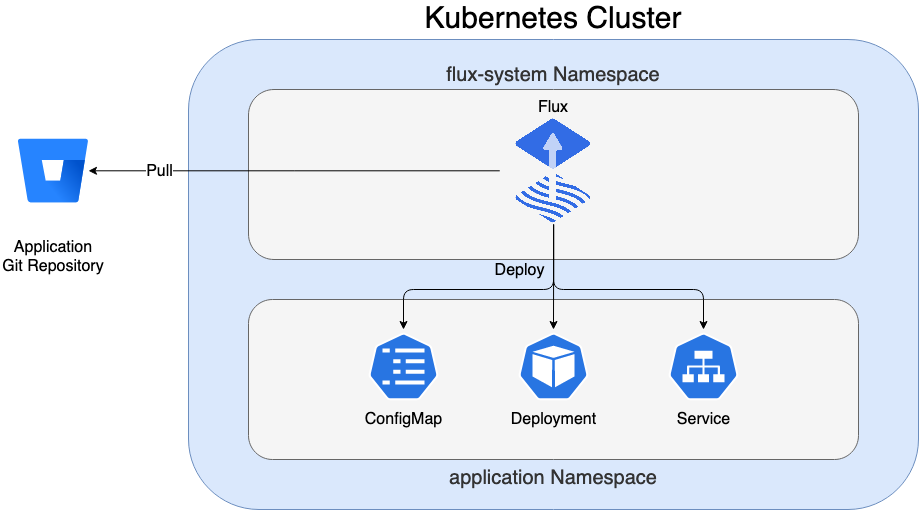
The change is deployed via a reconciliation method. This means that Flux will not destroy and create all resources, but only make the changes needed to match the state described in the GIT repository. For example, you have a Deployment.yaml and Service.yaml, but only want to change the first one to use a new version of a container image. Then only the Deployment.yaml will be replaced within the cluster; without changing the service. In summary, the process of syncing the content in GIT is called GitOps.
What is GitOps?
In a GitOps approach, the state of the cluster is fully described in GIT repositories; it contains everything required to deploy an application (Deployment.yaml, Service.yaml, ConfigMap.yaml,…). To match the cluster with the state, we need an automated solution. In this case, Flux will execute a reconciliation when something has changed in GIT.
Using GitOps is considered a more developer-centric experience. It is based on tools and principles that developers already know, so additional knowledge is no longer needed.
The benefits of GitOps
The use of the GitOps approach implemented by Flux has a lot of benefits:
- the full Kubernetes cluster status is visible in GIT, making it more understandable for developers
- evelopment teams can work more independently as no complex deploy pipelines are needed
- it is a lot easier to set up additional applications that can be deployed on the Kubernetes cluster
- the use of pull request flows facilitates the monitoring of changes in applications
- branching or versioning strategies make it easy to keep different environments (test, acceptance, production) in sync.
- the approach can be uniform across all types of Kubernetes clusters (EKS, Rancher, OpenShift or a local setup)
- flux is lightweight and can be easily installed on any Kubernetes cluster as the capacity is usually already in place
- flux has good documentation and an active community
Since the Flux resources are running within our cluster, there is no need to use other development tooling (such as Jenkins or Bamboo). This also has some advantages:
- less security issues as we use a pull approach and do not need to store credentials in external tools
- no unexpected downtime caused by external deployment tools
- less overhead because there is no need to maintain any deployment tools
How to manage applications with Flux
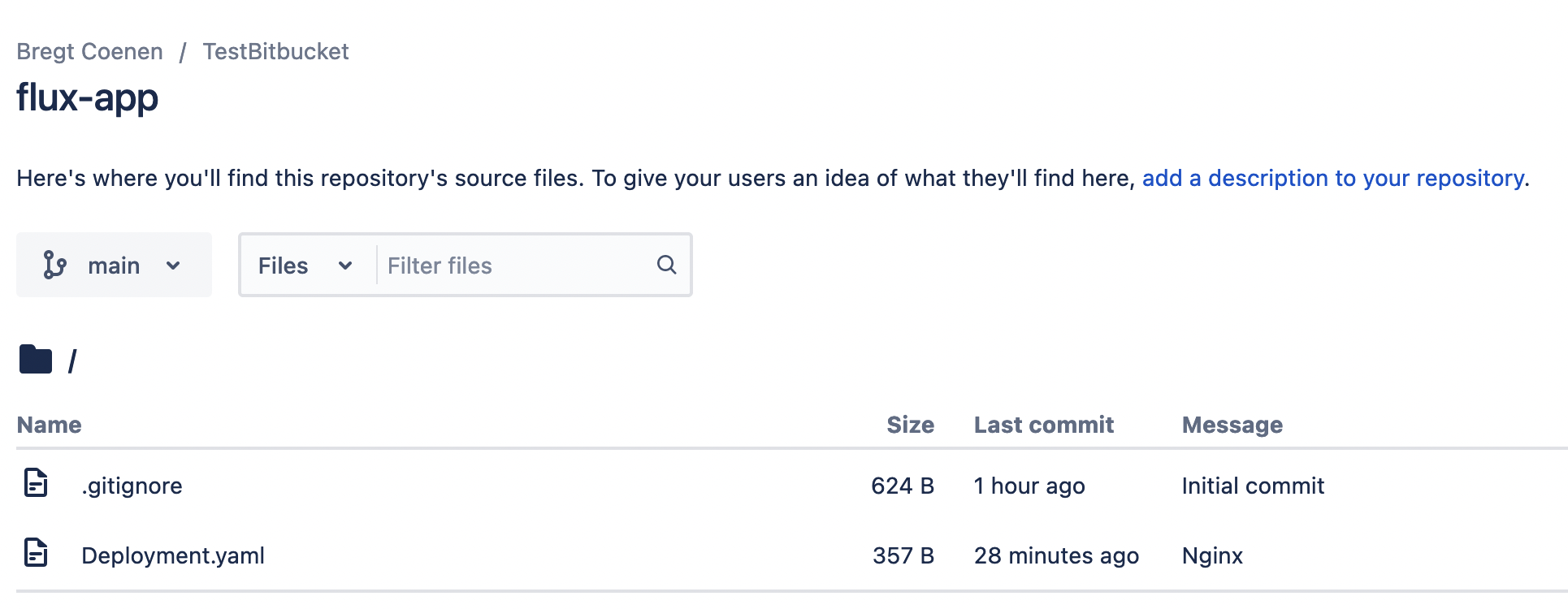
Suppose we have a GIT repo called flux-app that contains the Deployment.yaml we want to deploy. How can we instruct Flux to create this Deployment in the Kubernetes cluster?
Before we can deploy our applications, we first need to install Flux. Flux also uses a GitOps approach to manage its own installation:
- create a GIT repository that will contain the resources for the Flux installation
- download the Flux CLI
- run the bootstrap command
flux bootstrap git \
--url=ssh://git@bitbucket.org/sample-repo/flux-installation.git \
--private-key-file=/Users/yourname/.ssh/flux \
--branch=main \
--path=./clusters/rancher-desktop-local
The YAML files are stored in the aforementioned GIT repository and are applied to your cluster. The main resources created are visible in the image below.
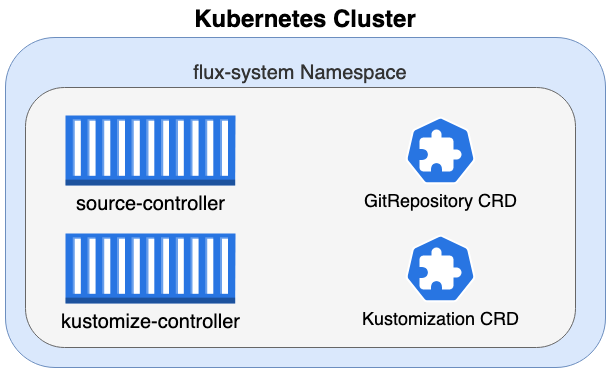
The Flux installation has added 4 important components to our Kubernetes cluster:
- source-controller pod
- kustomize-controller pod
- GitRepository CRD (Custom Resource Definition)
- Kustomization CRD (Custom Resource Definition)
⚠️ What are Custom Resource Definitions?
Kubernetes provides a specific set of API resources by default. These are the well-known resources such as Pods, ConfigMaps, Deployments, Secrets. A CR, Custom Resource, is an extension to the Kubernetes API. It provides a way to add new resource types in addition to these existing resources. However, as with known resources, we need a specification on how to create such a resource.
The CustomResourceDefinition (CRD) is basically a blueprint of what the CustomResource (CR) should look like. Moreover, we need logic on what should happen when such a resource is created. This logic is usually added to the application container, which monitors the CRD for changes and takes the required actions when they occur.
In the case of Flux, the source-controller pod has the logic to take actions when a GitRepository CR is created/modified. Similarly, the kustomize controller pod has the logic to take actions when a Kustiomization CR is created / modified. Flux provides the CustomResourceDefintion (blueprint) and the logic (running in the containers) to do something with a Custom Resource. The Custom Resource is added to the Kubernetes cluster in the next steps.
Adding GitRepository Custom Resources
Now that we have the GitRepository CustomResourceDefinition and the source controller, we can start adding GitRepository resources. This resource contains the logic to connect to the GIT repository where your application's YAML files are stored.
apiVersion: source.toolkit.fluxcd.io/v1beta2
kind: GitRepository
metadata:
name: flux-app
namespace: flux-app
spec:
gitImplementation: go-git
interval: 1m0s
ref:
branch: main
secretRef:
name: bitbucket-cloud-credentials
timeout: 60s
url: https://bitbucket.org/sample-repo/application
We create the GitRepository resource.
kubectl create -f GitRepository.yaml
NAME URL AGE READY STATUS
flux-app https://bitbucket.org/sample-repo/application 21m True stored artifact for revision 'main/9ad65085cfe584f438f71e361c4ad20ac9d04f55'
Note that the revision points to branch/commit-id
At this point, the GIT repository is viewed, but nothing is deployed to our cluster. To deploy the YAML files stored in the flux app GIT repository, we need to create a Kustomization resource.
⚠️ You will have to add a secret for authentication to the Bitbucket repository. Since this can be done in multiple ways, this has not been added to this article. When the secret is created, you need to reference it in your GitRepository yaml file.
secretRef: name: bitbucket-cloud-credentials
More information can be found here!
Adding Kustomization Custom Resources
The Kustomization resource will configure which GitRepository resource to watch for changes. Once the GitRepository resource points to a new revision, the kustomize-controller will deploy the current version of the artifacts to the cluster.
apiVersion: kustomize.toolkit.fluxcd.io/v1beta2
kind: Kustomization
metadata:
name: flux-app
namespace: flux-app
spec:
force: true
interval: 1m0s
path: ./
prune: false
sourceRef:
kind: GitRepository
name: flux-app
We create the Kustomization resource.
kubectl create -f Kustomization.yaml
When we get the status of the created Kustomization resource, we see that it corresponds to the latest revision.
kubectl -n flux-app get kustomization flux-app
NAME AGE READY STATUS
flux-app 37m True Applied revision: main/9ad65085cfe584f438f71e361c4ad20ac9d04f55
When checking BitBucket, we see there is a Deployment file in our GIT repository - the commit matches the one mentioned by Kustomization.
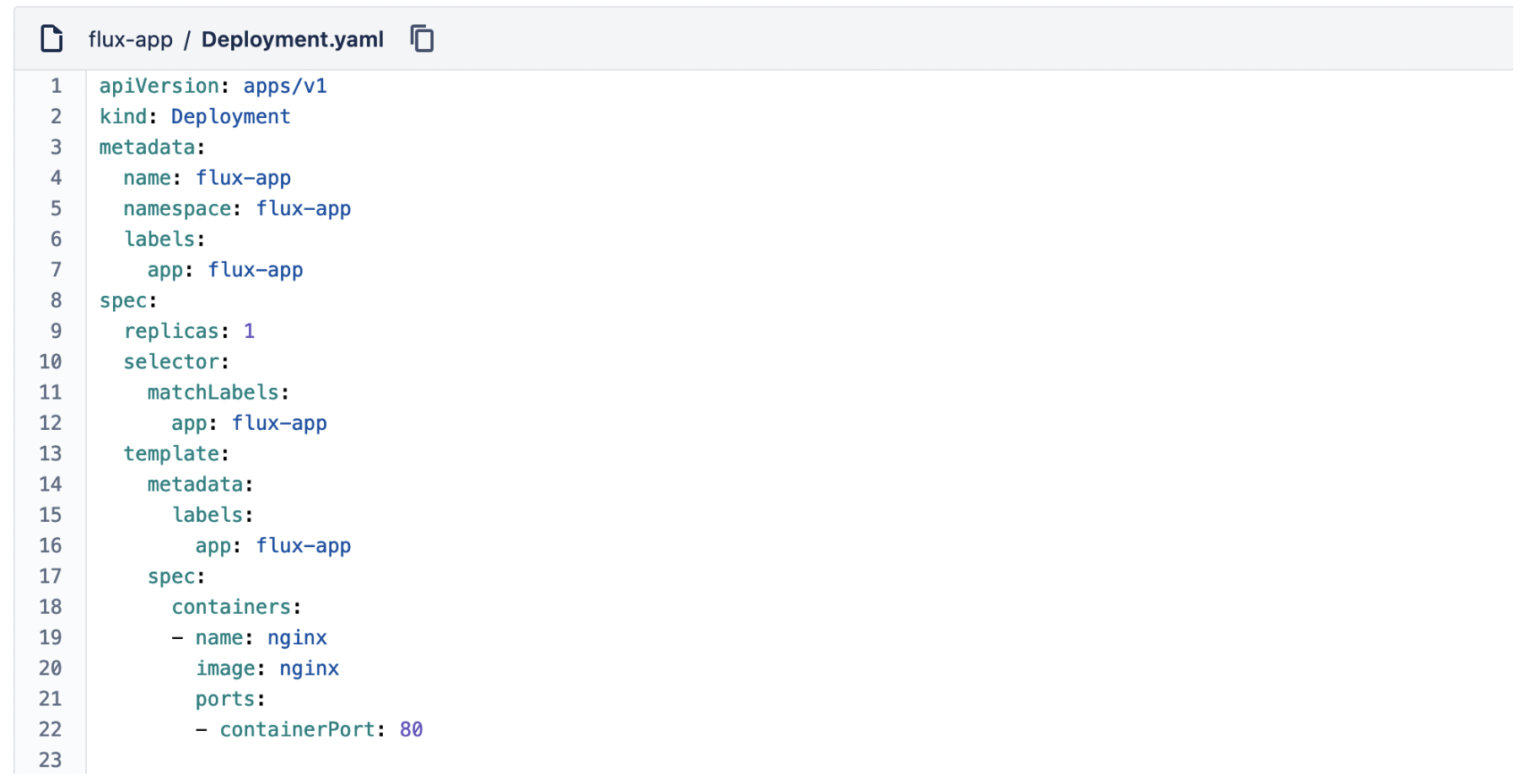
This Deployment has been applied to our Kubernetes cluster.
kubectl -n flux-app get pod
NAME READY STATUS RESTARTS AGE
flux-app-7ddd9dd674-xp24s 1/1 Running 0 5m49s
Putting things together

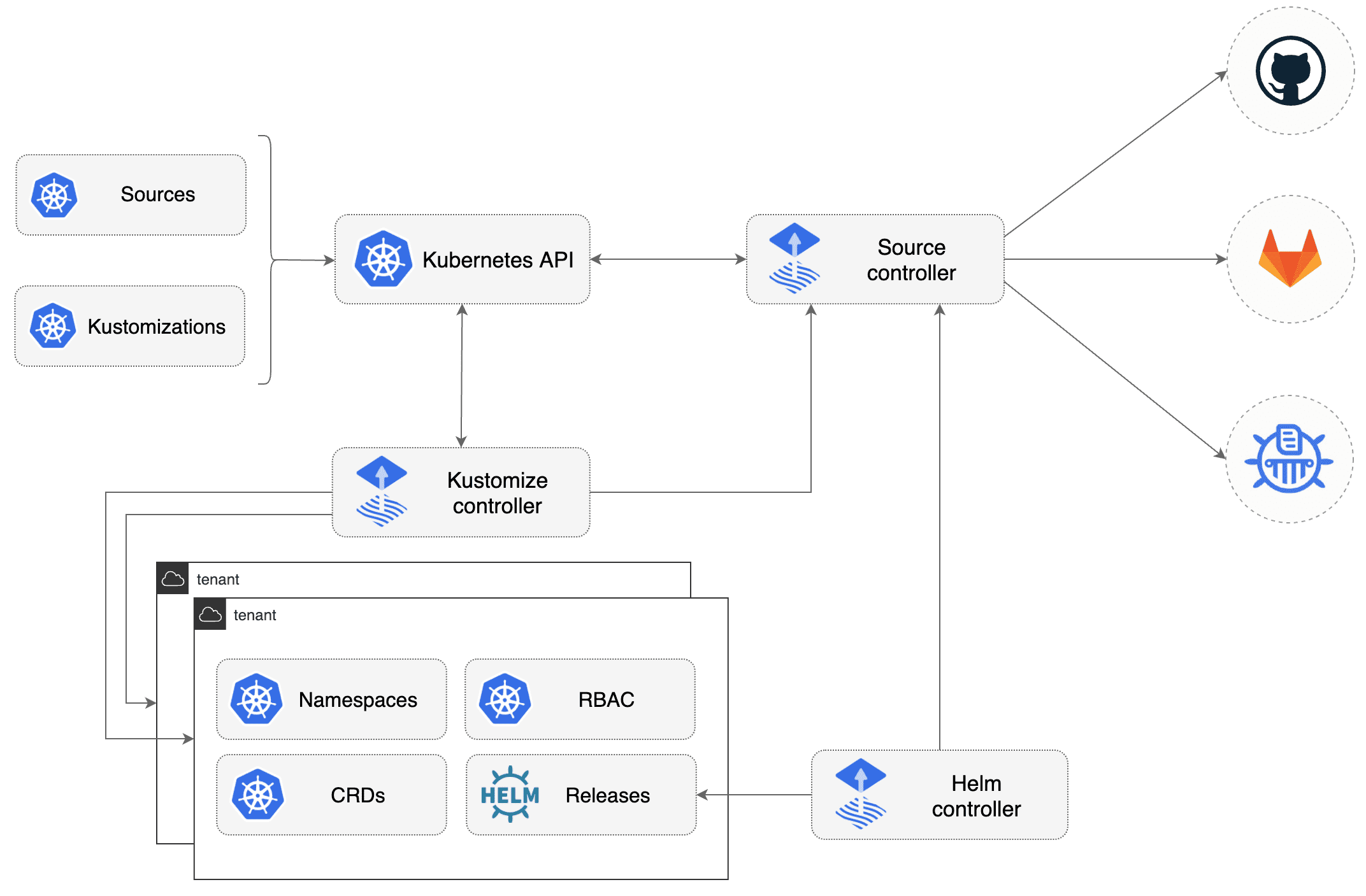
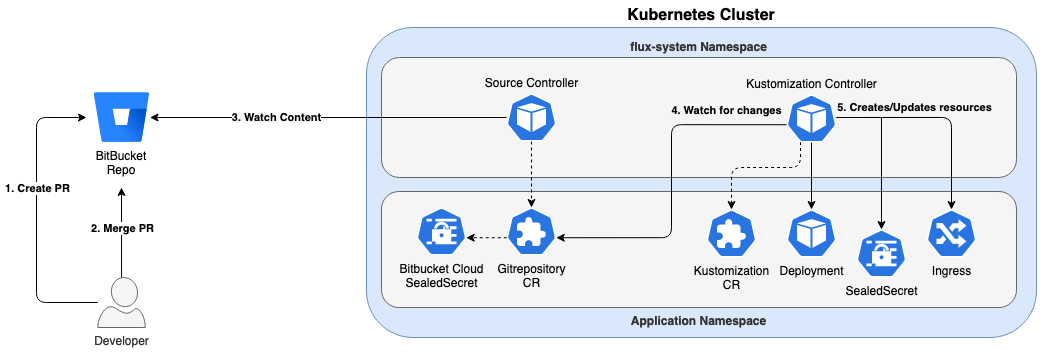
To summarize, the above design summarizes the flow:
- a developer creates a pull request
- the pull request is aggregated to a branch monitored by flux
- the source controller monitors the branch; it will notice a new commit id and change the revision of the GitRepository source to 'branch/commit-id'.
- the kustomization controller watches the GitRepository source
- if a new version is noticed, the new version of the files will be applied, the revision of the Kustomization source will be changed to 'branch/commit-id'
Conclusion
In this blogpost, we’ve explained how Flux works and how easy it is to use Flux for continuous delivery. Within ACA, we are currently doing the migration from complex Jenkins deploy pipelines to an easy to understand GitOps approach using Flux. We believe that this GitOps approach will become the standard way to deploy workloads in the near future.
Want to know more about Flux?

What others have also read


CloudBrew has always been a highlight on our calendar, but the 2025 edition felt different. Perhaps it was the timing. Just the month prior, November 2025, the Azure Belgium Central region finally opened its doors. ACA has always operated from the heart of Europe, so seeing this massive national milestone go live just before the conference added a layer of excitement.
Read more

Better uptime, lower costs, and avoiding vendor lock-in. These are three of the reasons why our customers opt for a multicloud strategy. Our Cloud Project Manager Roel Van Steenberghe explains what such a strategy entails and what the advantages of Google Cloud Platform (GCP) are.
Read more

In the complex world of modern software development, companies are faced with the challenge of seamlessly integrating diverse applications developed and managed by different teams. An invaluable asset in overcoming this challenge is the Service Mesh. In this blog article, we delve into Istio Service Mesh and explore why investing in a Service Mesh like Istio is a smart move." What is Service Mesh? A service mesh is a software layer responsible for all communication between applications, referred to as services in this context. It introduces new functionalities to manage the interaction between services, such as monitoring, logging, tracing, and traffic control. A service mesh operates independently of the code of each individual service, enabling it to operate across network boundaries and collaborate with various management systems. Thanks to a service mesh, developers can focus on building application features without worrying about the complexity of the underlying communication infrastructure. Istio Service Mesh in Practice Consider managing a large cluster that runs multiple applications developed and maintained by different teams, each with diverse dependencies like ElasticSearch or Kafka. Over time, this results in a complex ecosystem of applications and containers, overseen by various teams. The environment becomes so intricate that administrators find it increasingly difficult to maintain a clear overview. This leads to a series of pertinent questions: What is the architecture like? Which applications interact with each other? How is the traffic managed? Moreover, there are specific challenges that must be addressed for each individual application: Handling login processes Implementing robust security measures Managing network traffic directed towards the application ... A Service Mesh, such as Istio, offers a solution to these challenges. Istio acts as a proxy between the various applications (services) in the cluster, with each request passing through a component of Istio. How Does Istio Service Mesh Work? Istio introduces a sidecar proxy for each service in the microservices ecosystem. This sidecar proxy manages all incoming and outgoing traffic for the service. Additionally, Istio adds components that handle the incoming and outgoing traffic of the cluster. Istio's control plane enables you to define policies for traffic management, security, and monitoring, which are then applied to the added components. For a deeper understanding of Istio Service Mesh functionality, our blog article, "Installing Istio Service Mesh: A Comprehensive Step-by-Step Guide" , provides a detailed, step-by-step explanation of the installation and utilization of Istio. Why Istio Service Mesh? Traffic Management: Istio enables detailed traffic management, allowing developers to easily route, distribute, and control traffic between different versions of their services. Security: Istio provides a robust security layer with features such as traffic encryption using its own certificates, Role-Based Access Control (RBAC), and capabilities for implementing authentication and authorization policies. Observability: Through built-in instrumentation, Istio offers deep observability with tools for monitoring, logging, and distributed tracing. This allows IT teams to analyze the performance of services and quickly detect issues. Simplified Communication: Istio removes the complexity of service communication from application developers, allowing them to focus on building application features. Is Istio Suitable for Your Setup? While the benefits are clear, it is essential to consider whether the additional complexity of Istio aligns with your specific setup. Firstly, a sidecar container is required for each deployed service, potentially leading to undesired memory and CPU overhead. Additionally, your team may lack the specialized knowledge required for Istio. If you are considering the adoption of Istio Service Mesh, seek guidance from specialists with expertise. Feel free to ask our experts for assistance. More Information about Istio Istio Service Mesh is a technological game-changer for IT professionals aiming for advanced control, security, and observability in their microservices architecture. Istio simplifies and secures communication between services, allowing IT teams to focus on building reliable and scalable applications. Need quick answers to all your questions about Istio Service Mesh? Contact our experts
Read moreWant to dive deeper into this topic?
Get in touch with our experts today. They are happy to help!

Want to dive deeper into this topic?
Get in touch with our experts today. They are happy to help!

Want to dive deeper into this topic?
Get in touch with our experts today. They are happy to help!

Want to dive deeper into this topic?
Get in touch with our experts today. They are happy to help!