Requirements
To implement this alternative approach, there are a few requirements that must be met:
- You must be deploying the container in a Kubernetes cluster.
- The application must support adding JVM parameters via an environment variable.
Starting Point
Let's assume that your application is using a StatefulSet that looks something like this:
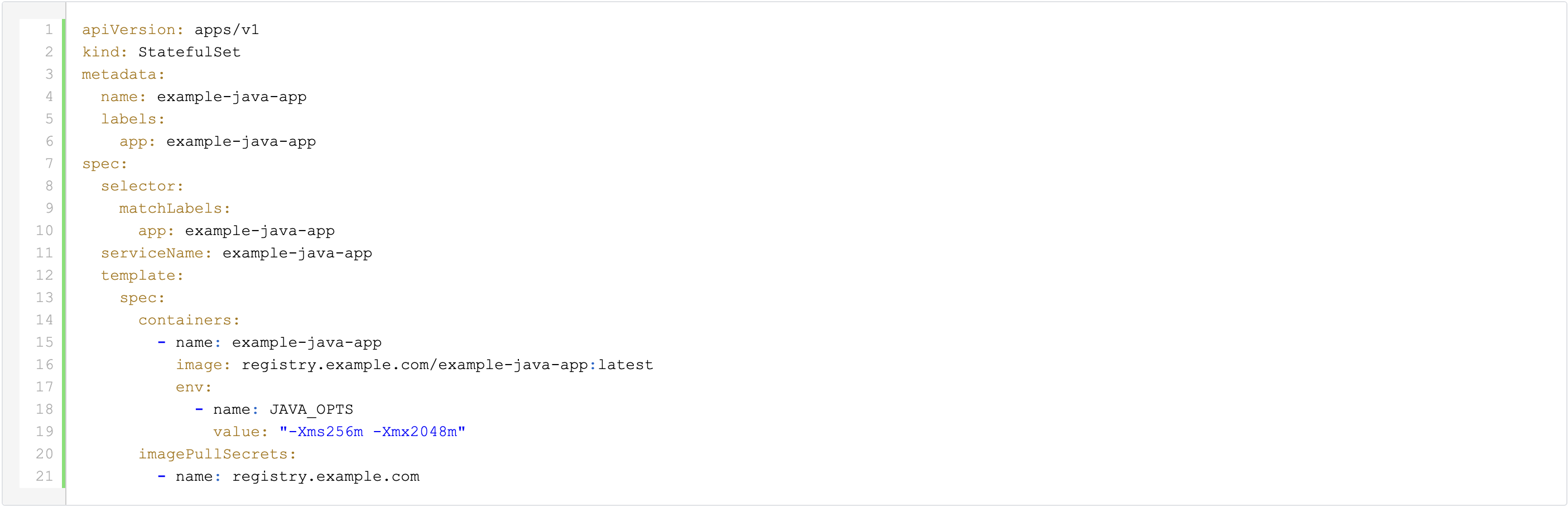
The name of the JAVA_OPTS environment variable may vary depending on the specific application.
Packaging the New Relic agent jar
To simplify the deployment process, we will create a custom image which contains the New Relic agent jar. To create this image, we will use a Container File, which might look something like this:

"Injecting" the New Relic agent into the application container
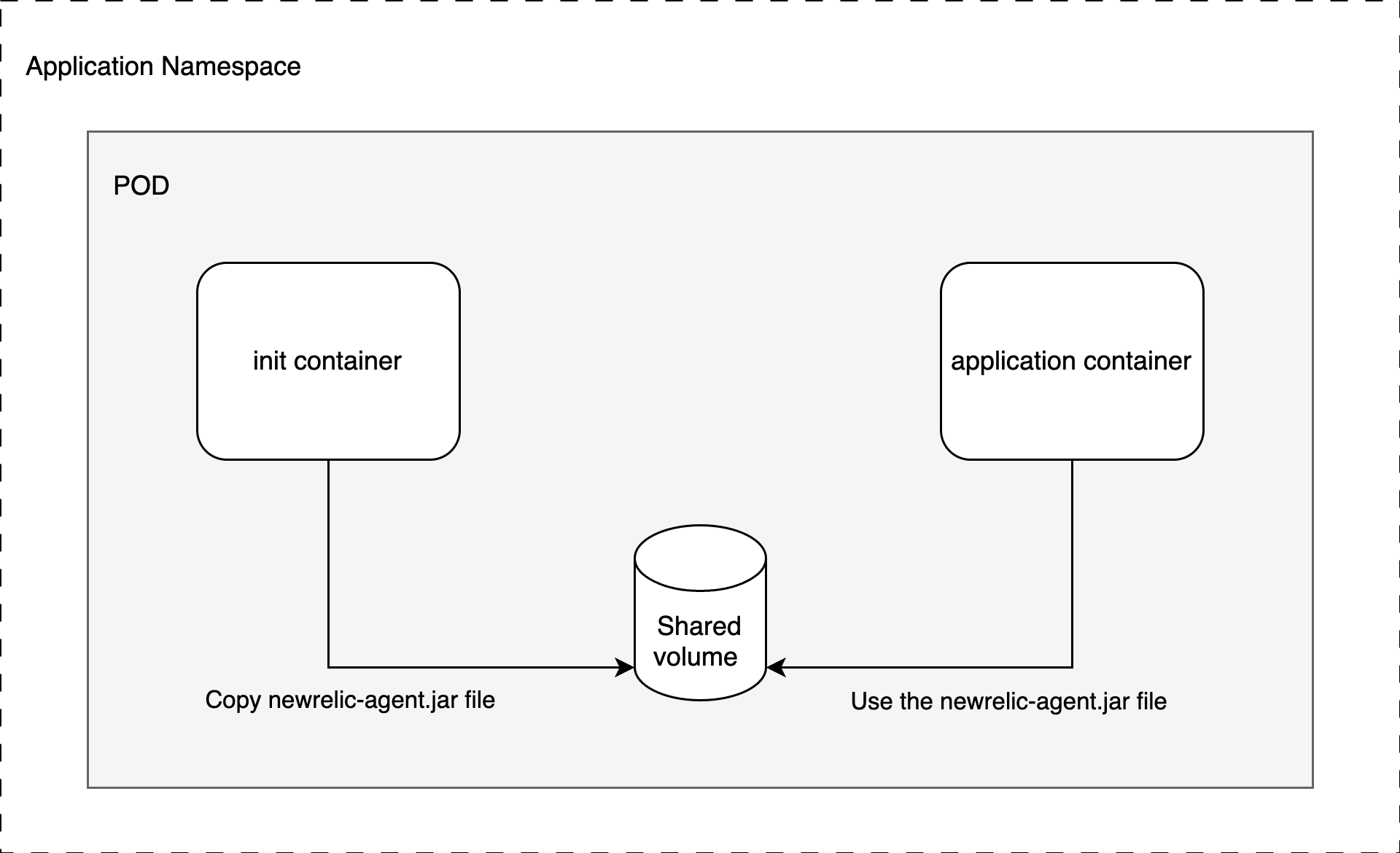
In order to direct the application to use the New Relic agent jar, we will utilize the Kubernetes Init Container and emptyDir concepts.
The resulting StatefulSet will look like this:

Instead of including the New Relic agent jar in the application image, we use our custom newrelic-agent image as an Init Container. This container copies the newrelic.jar file to an emptyDir volume.
Since the Init Container runs before the regular application container and both share the same volume, the newrelic.jar file is accessible when the JVM starts.
Apart from the shared volume, we need a few New Relic agent specific environment variables:
- NEW_RELIC_APP_NAME: to set the application name
- NEW_RELIC_LICENSE_KEY: to provide the license key
- NEW_RELIC_LOG_FILE_NAME: to optionally set a non-default log location, in this case STDOUT
There are a few additional environment variables available in the New Relic Java agent documentation that can be used.
In addition to this basic configuration, you can use the New Relic server-side agent configuration.
As you can see in the JAVA_OPTS environment variable, we still need to instruct the JVM to use the New Relic agent jar. It’s worth mentioning that this particular file is located on the shared volume.
Also note the "imagePullPolicy" which we have set to "Always" to ensure we always retrieve the latest image version even if it is still using the same tag.
Updating the New Relic agent
To ensure that the New Relic agent is always up-to-date, you can set up a Continuous Integration pipeline that automatically builds a new container image whenever a new agent version becomes available.
Additionally, you can tag the image with major, major.minor, and major.minor.patch, in addition to "latest". This allows you to pin the agent version based on the specific requirements of your application.
Depending on the image tag specified in the application's manifest file, updating could be as easy as restarting the application pods.
If you prefer to pin the New Relic agent to a specific version, you will need to update the newrelic-agent image tag in the StatefulSet and deploy this change to your Kubernetes cluster.
In any case, you no longer need to build a custom image just to add the New Relic agent jar, which should allow for more frequent updates to the agent.
Diagram

Do you want to discover more about Kubernetes?


What others have also read


CloudBrew has always been a highlight on our calendar, but the 2025 edition felt different. Perhaps it was the timing. Just the month prior, November 2025, the Azure Belgium Central region finally opened its doors. ACA has always operated from the heart of Europe, so seeing this massive national milestone go live just before the conference added a layer of excitement.
Read more

Better uptime, lower costs, and avoiding vendor lock-in. These are three of the reasons why our customers opt for a multicloud strategy. Our Cloud Project Manager Roel Van Steenberghe explains what such a strategy entails and what the advantages of Google Cloud Platform (GCP) are.
Read more

In the complex world of modern software development, companies are faced with the challenge of seamlessly integrating diverse applications developed and managed by different teams. An invaluable asset in overcoming this challenge is the Service Mesh. In this blog article, we delve into Istio Service Mesh and explore why investing in a Service Mesh like Istio is a smart move." What is Service Mesh? A service mesh is a software layer responsible for all communication between applications, referred to as services in this context. It introduces new functionalities to manage the interaction between services, such as monitoring, logging, tracing, and traffic control. A service mesh operates independently of the code of each individual service, enabling it to operate across network boundaries and collaborate with various management systems. Thanks to a service mesh, developers can focus on building application features without worrying about the complexity of the underlying communication infrastructure. Istio Service Mesh in Practice Consider managing a large cluster that runs multiple applications developed and maintained by different teams, each with diverse dependencies like ElasticSearch or Kafka. Over time, this results in a complex ecosystem of applications and containers, overseen by various teams. The environment becomes so intricate that administrators find it increasingly difficult to maintain a clear overview. This leads to a series of pertinent questions: What is the architecture like? Which applications interact with each other? How is the traffic managed? Moreover, there are specific challenges that must be addressed for each individual application: Handling login processes Implementing robust security measures Managing network traffic directed towards the application ... A Service Mesh, such as Istio, offers a solution to these challenges. Istio acts as a proxy between the various applications (services) in the cluster, with each request passing through a component of Istio. How Does Istio Service Mesh Work? Istio introduces a sidecar proxy for each service in the microservices ecosystem. This sidecar proxy manages all incoming and outgoing traffic for the service. Additionally, Istio adds components that handle the incoming and outgoing traffic of the cluster. Istio's control plane enables you to define policies for traffic management, security, and monitoring, which are then applied to the added components. For a deeper understanding of Istio Service Mesh functionality, our blog article, "Installing Istio Service Mesh: A Comprehensive Step-by-Step Guide" , provides a detailed, step-by-step explanation of the installation and utilization of Istio. Why Istio Service Mesh? Traffic Management: Istio enables detailed traffic management, allowing developers to easily route, distribute, and control traffic between different versions of their services. Security: Istio provides a robust security layer with features such as traffic encryption using its own certificates, Role-Based Access Control (RBAC), and capabilities for implementing authentication and authorization policies. Observability: Through built-in instrumentation, Istio offers deep observability with tools for monitoring, logging, and distributed tracing. This allows IT teams to analyze the performance of services and quickly detect issues. Simplified Communication: Istio removes the complexity of service communication from application developers, allowing them to focus on building application features. Is Istio Suitable for Your Setup? While the benefits are clear, it is essential to consider whether the additional complexity of Istio aligns with your specific setup. Firstly, a sidecar container is required for each deployed service, potentially leading to undesired memory and CPU overhead. Additionally, your team may lack the specialized knowledge required for Istio. If you are considering the adoption of Istio Service Mesh, seek guidance from specialists with expertise. Feel free to ask our experts for assistance. More Information about Istio Istio Service Mesh is a technological game-changer for IT professionals aiming for advanced control, security, and observability in their microservices architecture. Istio simplifies and secures communication between services, allowing IT teams to focus on building reliable and scalable applications. Need quick answers to all your questions about Istio Service Mesh? Contact our experts
Read moreWant to dive deeper into this topic?
Get in touch with our experts today. They are happy to help!

Want to dive deeper into this topic?
Get in touch with our experts today. They are happy to help!

Want to dive deeper into this topic?
Get in touch with our experts today. They are happy to help!

Want to dive deeper into this topic?
Get in touch with our experts today. They are happy to help!