You might roll your eyes at yet another blog about something as boring as log management with ELK. But that’s not really the focus of this blog post. Here, we dive deeper into the security aspect of an ELK stack and help you set up one yourself.
Log file chaos
Let’s say you are a system engineer/person involved in DevOps and have all these logs sitting on lots of permanent or temporary (cloud) servers. And then there are your colleagues: developers, auditors and regular users that need to read these logs or get reports. Giving all these people access to these logs will probably result in living hell, if it’s at all possible.
It gets even harder when the servers and their logs are part of a highly available environment, where there are lots of servers and lots of logs and it is even more difficult (read: impossible) to get logs from servers that no longer exist due to an autoscaling ‘scale in’ event. The solution is to use a log management system. A system like that gets the logs from all your servers, transforms and indexes them and finally stores them, ready for analysis and reporting.
Introduction to B+ELK a.k.a Elastic Stack
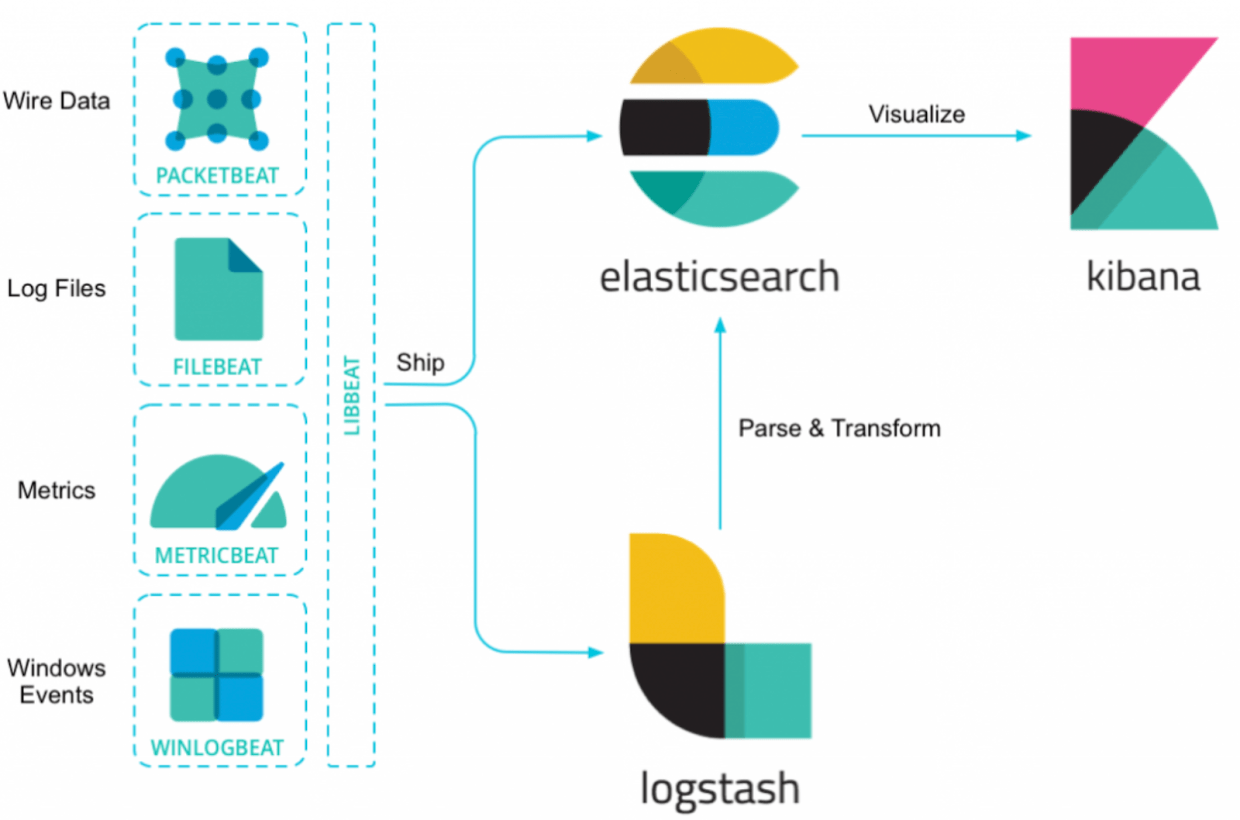
An Elastic Stack uses different ‘Beats’ to collect and ship the data to Logstash, where it is transformed and then pushed and stored in Elasticsearch. Then, everything is visualized in Kibana with nice graphs and filters so you can easily find what you need.
Secure logins and encrypted everything
An Elastic Stack is fairly easy to install with Docker. If you are using Rancher (for Docker container orchestration), you can actually have a running Elastic Stack within just a few minutes. And it actually works as well, no funny business there.
However, little to no attention is paid to safety and security. Usually, when you look at an Elk Stack in a company, you can find it at an http address (so not encrypted), you do not have to log in (even guests of the network that stumble upon the server address can have a look at your log errors) and anyone can just manipulate the data inside Elasticsearch (ideal if you want to cover up failed login attempts)!

Both the open source Search Guard security plugin as well as X-Pack from Elastic.co (recently renamed to the less-catchy Elastic Stack Features) help make the Elastic Stack secure. An important difference is that X-Pack needs a paid license and Search Guard is open source for a lot of features and you can get a paid license when you need to integrate LDAP or AD and/or you need to control access to specific data. Simply looking at the cost, we choose to use the open source version of Search Guard, the ‘Community Edition’ at ACA Group.
Setting up the entire stack
As a child, I almost exclusively played with Lego (Nintendo and internet didn’t really exist or were still pretty unheard of). The fun thing with LEGO is that you can combine all types of bricks and make something completely new. The only limit is your imagination!
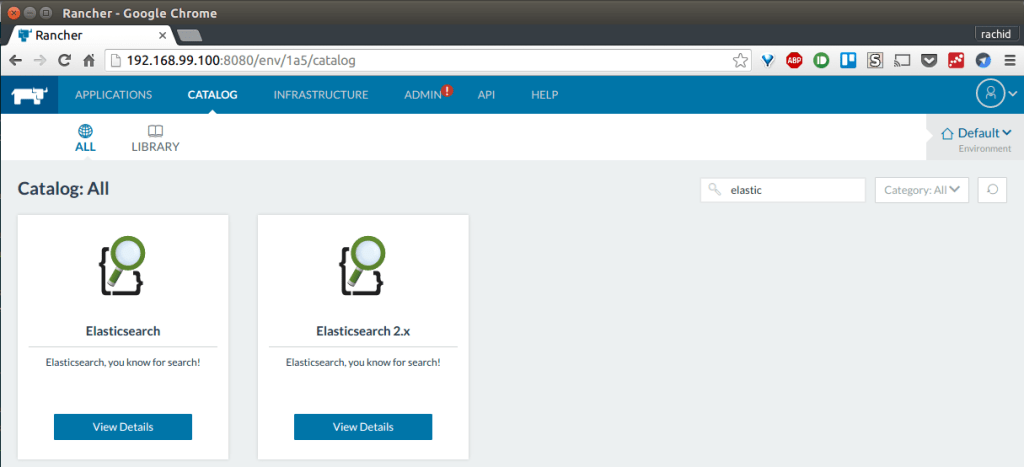
When building this ELK platform, I looked at it in much the same way. I used the ELK Stack from Rancher 1.6 (see here) and replaced all the containers with docker Search-Guard container for Elasticsearch, Logstash and Kibana from https://github.com/khezen.
For ElasticSearch management I picked Cerebro (Kopf does not work with Secure Elastic Stack) and last, Curator to clean up old indexes.
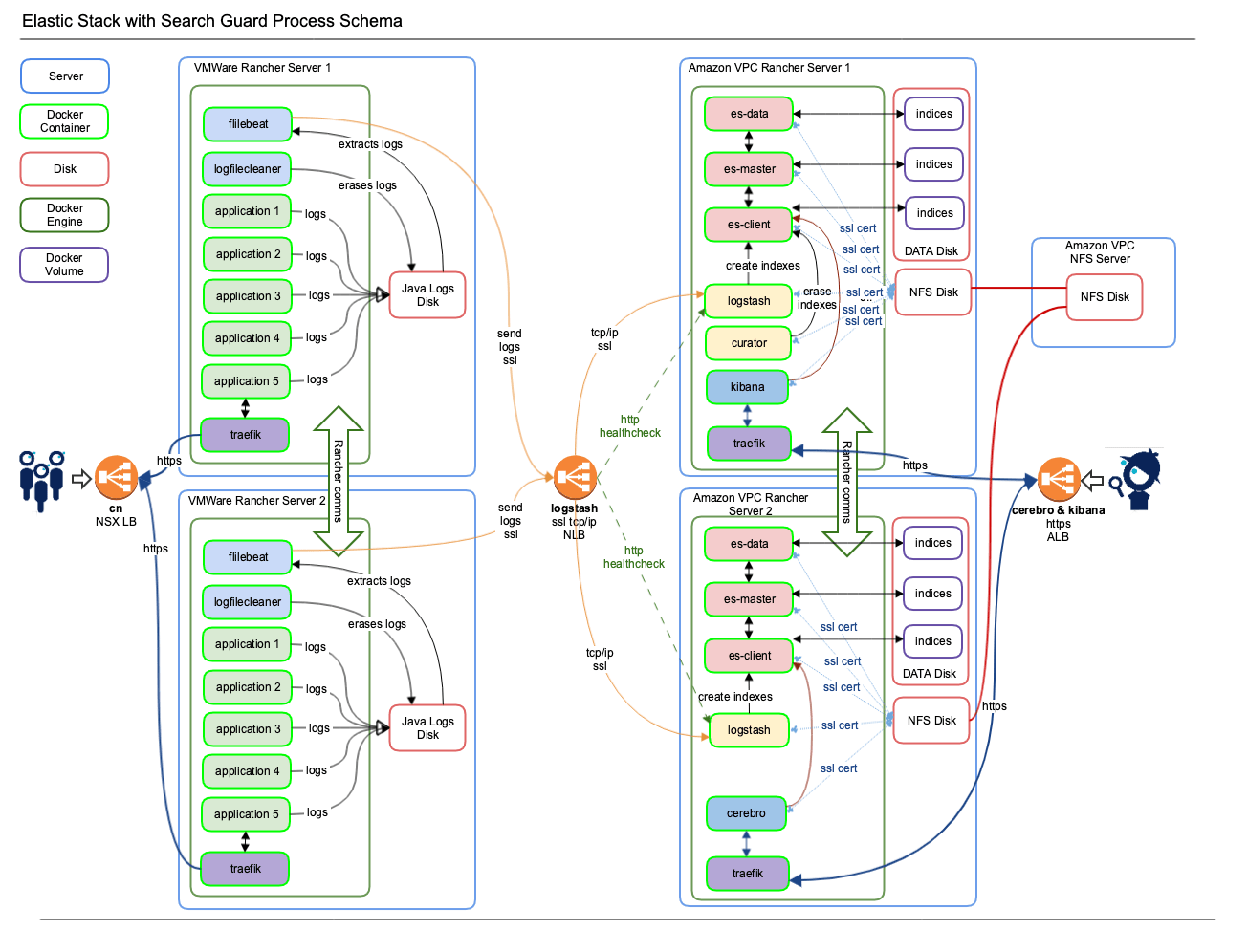
Traefik containers handle both the secure SSL traffic on TLS 1.2 and good Ciphers only (I dislike POODLE) and the load balancing to the applications in the back. The Traefik containers are in turn connected to Amazon ALB’s for Kibana and Cerebro. Then I added a Beats stack with filebeat and metricbeat on all application servers to collect logs or other data. And also a homebrew log file cleaner to keep the logs themselves under control.
To sum it up:
- Elasticsearch, Kibana, Logstash, Traefik, Curator and Cerebro all reside on Amazon VPC servers with Rancher.
- Applications are nurtured by Beats containers and lead their life cycles on VMWare servers with Rancher.
This is what the entire stack looks like. Keep in mind that the Rancher Master server and Rancher Agent 3 are NEVER displayed (but they’re there for sure!).
Component list
- Amazon ALB for Kibana and Cerebro
- Amazon NLB for Logstash
- Amazon EC2 servers m5.large for master and m5.xlarge for agents each with 200 GB SSD for indexes
- Cerebro
- Curator
- Docker 18.06.x
- ElasticSearch with Search Guard
- Logstash with Search Guard
- Kibana with Search Guard
- NFS or similar to share certificates
- Rancher 1.6
- RHEL 7.6
- Traefik
- VMWare application servers, all approximately m5.xlarge in size
- VMWare NSX load balancers
💡 TIP #1: There is a direct relationship between the amount of servers and logs that you feed to Elasticsearch and the disk storage that you use. The more servers, the more logs, the higher the amount of disk storage you need. However, if you clean indexes that you do not need correctly with Curator and you make sure your colleague devs and you try to keep the logs down (which is only good practice anyways), then the amount of disk you need can stay low. Bonus: it will also keep your ELK fast!
💡TIP #2: Keep all your shards for all indexes on all disks with a regular cron job insides. It keeps Elasticsearch healthier and possibly faster for longer at very little extra cost.
Rancher stacks
On Amazon VPC – Rancher master with 3 Rancher agents
- Elasticsearch stack – with es-client (3x), es-data (3x) and es-master (3x)
- Kibana stack – with Kibana (1x) and Cerebro (1x)
- Logstash stack – with Logstash (3x) and Curator (1x)
On VMWare internal servers – Rancher master with 3 Rancher agents
- Beats stack – with filebeat (3x) and log file cleaner (3x)
- Application stacks – with your favorite apps
Certificates & passwords
A Search Guard script inside the khezen Elasticsearch container will create certificates on the first run. However, this did not seem to work well for me, as these certificates are created by isolated for each Elasticsearch container. So, this means that you have about nine servers creating their own (self-signed) certificates. The certificates are ‘only’ used for communication between all the Elastic Stack components, so self-signed certificates don’t hurt. Of course, some of the certificates need to be the same for all of the containers of the platform.
You can either fix the lack of certificate uniformity by:

- Putting the certificates inside the docker container, but this is rather unsafe.
- Making a script that only allows one of the containers to create these certificates (if they are not present from previous run) and share them through NFS with a container volume mount. This is what I did.
- Generating the certificates yourself and putting them in NFS.
- Putting your certificates in Rancher Secrets or Kubernetes Secrets. This will be a lot of work, as there are a LOT of certificates, but it is the safest and lowest maintenance option.

If you use Rancher and/or Kubernetes, then you’ll know that you can store passwords in Rancher Secrets and Kubernetes Secrets. You can then share them with the containers that need them.
Result: a secure logging platform
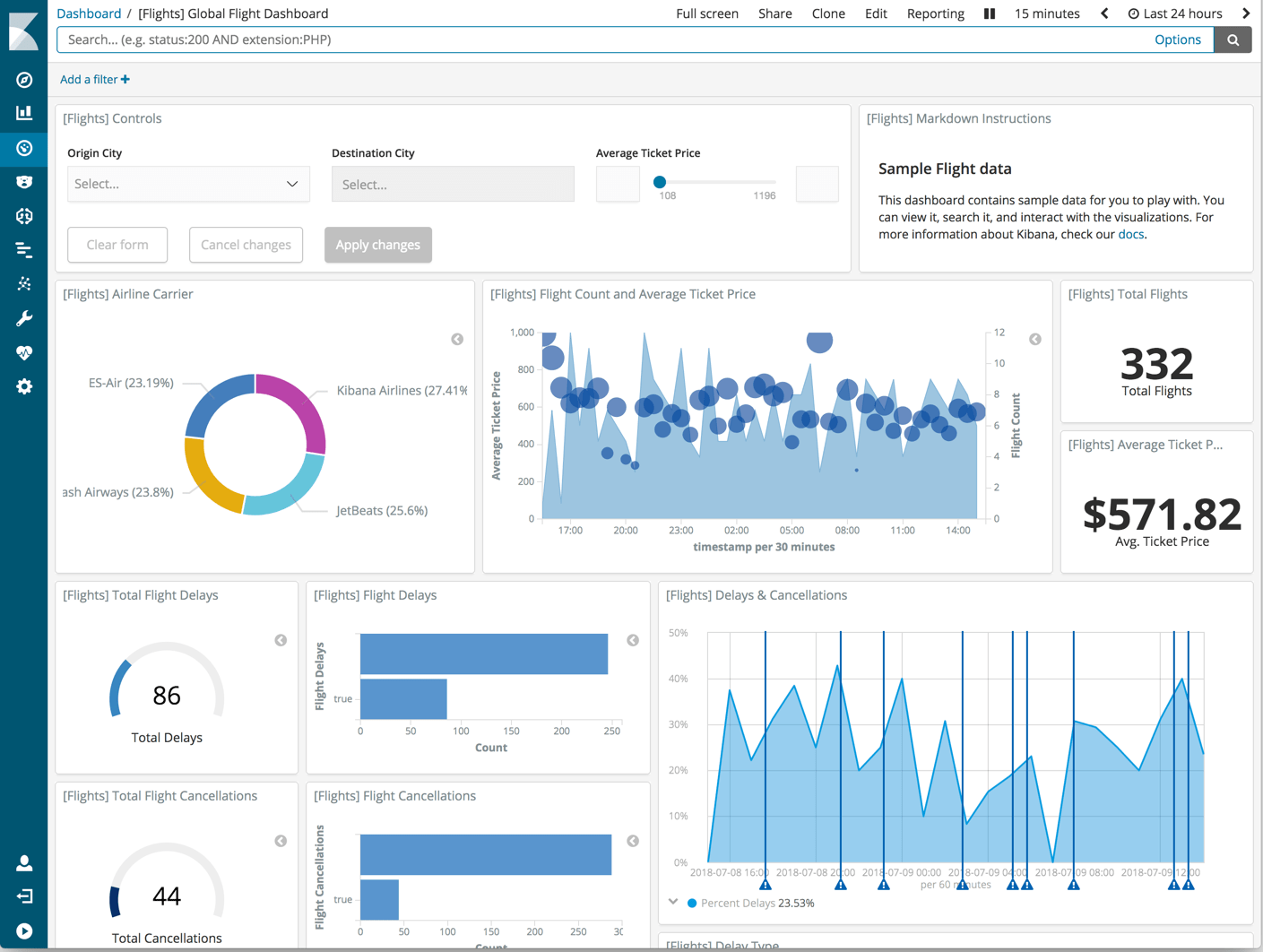
When you have done everything right, you should end up with a Kibana that is behind an Amazon ALB with certificates for https. You can then log in with the user account that you defined. Here’s an example of a Kibana dashboard:
Technical details
Below you can find all the technical details for:
- Amazon AWS logstash NLB
- Kibana Stack – docker-compose.yml
- Logstash Stack – docker-compose.yml
- Elasticsearch Stack – docker-compose.yml
- BEATS Stack – docker-compose.yml
Click the links to jump to the technical details for each component.
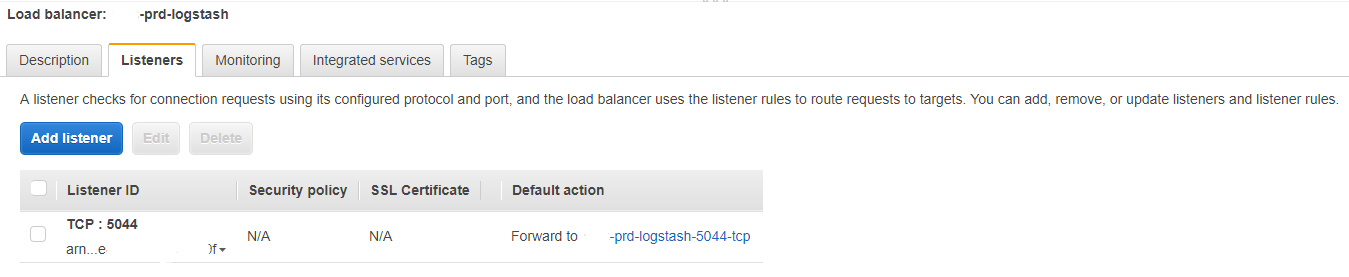
Amazon AWS logstash NLB
Load balancer - Listeners

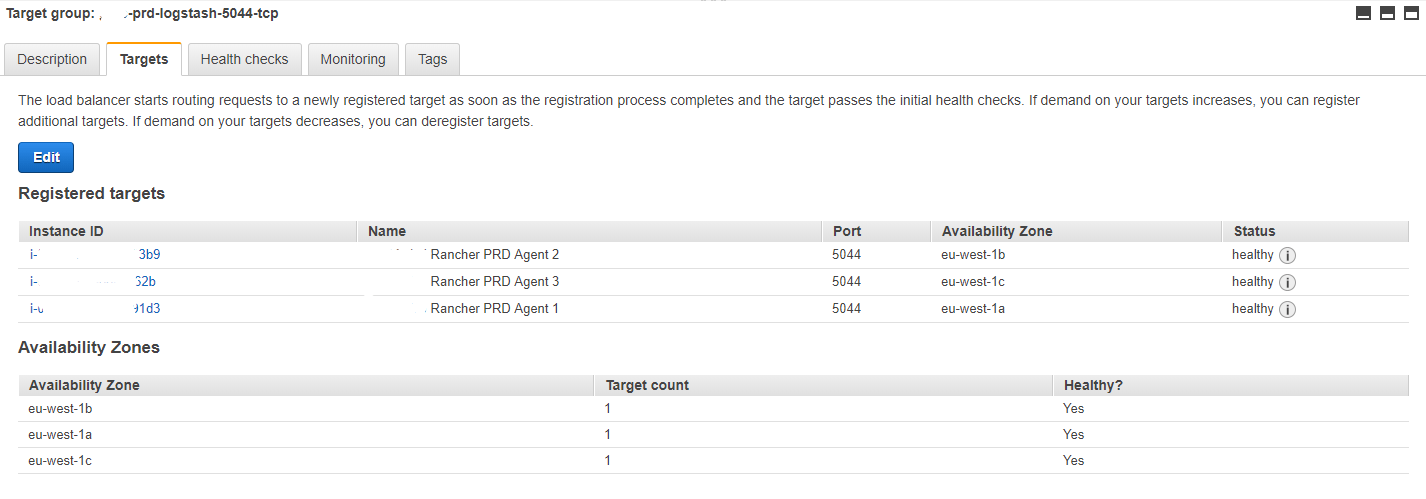
Target Groups - Targets

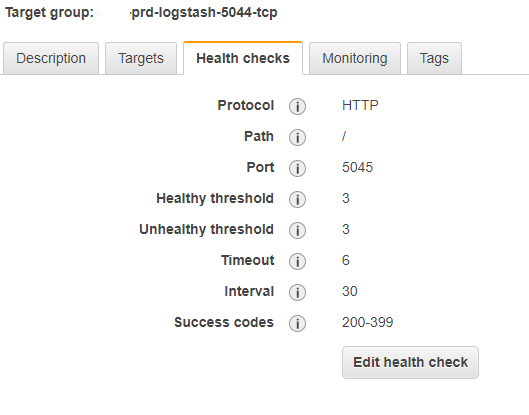
Target group – Health Checks

Kibana Stack – docker-compose.yml
version: '2'
services:
nginx-proxy:
image: rancher/nginx:v1.9.4-3
volumes_from:
- nginx-proxy-conf
secrets:
- ELK_KIBANA_PWD
labels:
io.rancher.sidekicks: kibana6,nginx-proxy-conf
io.rancher.container.hostname_override: container_name
kibana-vip:
image: rancher/lb-service-haproxy:v0.7.6
stdin_open: true
tty: true
ports:
- 50080:50080/tcp
labels:
io.rancher.container.agent.role: environmentAdmin
traefik.frontend.rule: Host:platform-kibana.aca-it.be
traefik.port: '50080'
io.rancher.container.create_agent: 'true'
nginx-proxy-conf:
image: rancher/nginx-conf:v0.2.0
secrets:
- ELK_KIBANA_PWD
command:
- -backend=rancher
- --prefix=/2015-07-25
labels:
io.rancher.container.hostname_override: container_name
kibana6:
image: repository-x.artifactrepo.aca-it.be/sgelk/sgkibana:1.0.0
environment:
ELASTICSEARCH_HOST: es-client.es-cluster
ELASTICSEARCH_PORT: '9200'
ELASTICSEARCH_URL: https://es-client.es-cluster:9200
stdin_open: true
network_mode: container:nginx-proxy
volumes:
- /app/data/elasticsearch/config/searchguard/ssl:/etc/elasticsearch/searchguard/ssl
tty: true
secrets:
- ELK_KIBANA_PWD
labels:
io.rancher.container.pull_image: always
io.rancher.container.hostname_override: container_name
cerebro:
image: repository-x.artifactrepo.aca-it.be/sgelk/sgcerebro:1.4.0
stdin_open: true
tty: true
environment:
ELK_CEREBRO_CLIENT1: 'ELASTICSEARCH CLIENT1 PRD'
ELK_CEREBRO_CLIENT2: 'ELASTICSEARCH CLIENT2 PRD'
ELK_CEREBRO_CLIENT3: 'ELASTICSEARCH CLIENT3 PRD'
ELK_CEREBRO_URL1: https://es-cluster-es-client-1:9200
ELK_CEREBRO_URL2: https://es-cluster-es-client-2:9200
ELK_CEREBRO_URL3: https://es-cluster-es-client-3:9200
SSL_CERT_AUTH: /etc/elasticsearch/searchguard/ssl/ca/root-ca.pem
secrets:
- ELK_CEREBRO_PWD
- ELK_ELASTIC_PWD
volumes:
- /app/util/cerebro:/opt/cerebro/logs
- /app/data/elasticsearch/config/searchguard/ssl:/etc/elasticsearch/searchguard/ssl
ports:
- 59000:9000/tcp
labels:
io.rancher.container.pull_image: always
traefik.frontend.rule: Host:platform-cerebro.aca-it.be
traefik.port: '9000'
secrets:
ELK_KIBANA_PWD:
external: 'true'
Logstash Stack – docker-compose.yml
version: '2'
services:
logstash:
image: repository-x.artifactrepo.aca-it.be/sgelk/sglogstash:1.8.1
environment:
ELASTICSEARCH_HOST: es-cluster-es-client-1
ELASTICSEARCH_HOST_THREE: es-cluster-es-client-3
ELASTICSEARCH_HOST_TWO: es-cluster-es-client-2
ELASTICSEARCH_PORT: '9200'
HEAP_SIZE: 1g
LOGSTASH_FILES: /etc/elasticsearch/searchguard/ssl/platform-logstash.
SSL_CERT: /etc/elasticsearch/searchguard/ssl/platform-logstash.crtfull.pem
SSL_CERT_AUTH: /etc/elasticsearch/searchguard/ssl/aca.root-ca.pem
SSL_KEY: /etc/elasticsearch/searchguard/ssl/platform-logstash.key.pem
stdin_open: true
external_links:
- es-cluster/es-client:elasticsearch
volumes:
- /app/data/logstash/data:/var/lib/logstash
- /app/data/elasticsearch/config/searchguard/ssl:/etc/elasticsearch/searchguard/ssl
- /app/util/logstash/logs:/var/log/logstash
tty: true
ports:
- 5044:5044/tcp
- 5045:5045/tcp
secrets:
- ELK_BEATS_PWD
- ELK_LOGSTASH_PWD
- ELK_TS_PWD
labels:
io.rancher.container.hostname_override: container_name
io.rancher.container.pull_image: always
io.rancher.scheduler.global: 'true'
curator:
image: repository-x.artifactrepo.aca-it.be/sgelk/sgcurator:1.6.0
environment:
CURATOR_USER: logstash
ELASTICSEARCH_HOST: es-cluster-es-client-1
ELASTICSEARCH_HOST_THREE: es-cluster-es-client-3
ELASTICSEARCH_HOST_TWO: es-cluster-es-client-2
ELASTICSEARCH_PORT: '9200'
LOGSTASH_FILES: /etc/elasticsearch/searchguard/ssl/logstash.
SSL_CERT_AUTH: /etc/elasticsearch/searchguard/ssl/ca/root-ca.pem
FILTER_ONE: docker-
FILTER_TWO: weblogic-
FILTER_THREE: metricbeat-
FILTER_FOUR: python-
FILTER_FIVE: rabbitmq-
FILTER_SIX: syslog-
FILTER_SEVEN: atlassian-
FILTER_EIGHT: placeholder-
UNIT_ONE: months
UNIT_COUNT_ONE: '2'
UNIT_TWO: months
UNIT_COUNT_TWO: '3'
UNIT_THREE: days
UNIT_COUNT_THREE: '14'
UNIT_FOUR: days
UNIT_COUNT_FOUR: '14'
UNIT_FIVE: months
UNIT_COUNT_FIVE: '1'
UNIT_SIX: days
UNIT_COUNT_SIX: '14'
UNIT_SEVEN: days
UNIT_COUNT_SEVEN: '14'
stdin_open: true
external_links:
- es-cluster/es-client:elasticsearch
volumes:
- /app/data/elasticsearch/config/searchguard/ssl:/etc/elasticsearch/searchguard/ssl
- /app/util/curator/logs:/var/log/curator
tty: true
secrets:
- ELK_CURATOR_PWD
labels:
io.rancher.container.pull_image: always
io.rancher.container.hostname_override: container_name
secrets:
ELK_TS_PWD:
external: 'true'
ELK_CURATOR_PWD:
external: 'true'
ELK_LOGSTASH_PWD:
external: 'true'
ELK_BEATS_PWD:
external: 'true'
Elasticsearch Stack – docker-compose.yml
version: '2'
volumes:
es-master-volume:
driver: local
per_container: true
es-data-volume:
driver: local
per_container: true
es-client-volume:
driver: local
per_container: true
services:
es-data:
cap_add:
- IPC_LOCK
image: repository-x.artifactrepo.aca-it.be/sgelk/sgelasticsearch:1.5.0
environment:
CLUSTER_NAME: es-cluster
HEAP_SIZE: 4096m
HOSTS: es-cluster-es-master-1, es-cluster-es-master-2, es-cluster-es-master-3
MINIMUM_MASTER_NODES: '2'
NODE_BOSS: es-cluster-es-master-1
NODE_DATA: 'true'
NODE_MASTER: 'false'
bootstrap.memory_lock: 'true'
node.max_local_storage_nodes: '99'
ulimits:
memlock:
hard: -1
soft: -1
nofile:
hard: 65536
soft: 65536
volumes_from:
- es-data-storage
secrets:
- ELK_BEATS_PWD
- ELK_CA_PWD
- ELK_ELASTIC_PWD
- ELK_KIBANA_PWD
- ELK_KS_PWD
- ELK_LOGSTASH_PWD
- ELK_TS_PWD
command:
- elasticsearch
labels:
io.rancher.sidekicks: es-data-storage,es-data-sysctl
io.rancher.container.hostname_override: container_name
io.rancher.container.pull_image: always
io.rancher.scheduler.global: 'true'
es-client-sysctl:
privileged: true
image: repository-x.artifactrepo.aca-it.be/platform-infra/alpine-sysctl:0.1-1
environment:
SYSCTL_KEY: vm.max_map_count
SYSCTL_VALUE: '262144'
network_mode: none
secrets:
- ELK_BEATS_PWD
- ELK_CA_PWD
- ELK_ELASTIC_PWD
- ELK_KIBANA_PWD
- ELK_KS_PWD
- ELK_LOGSTASH_PWD
- ELK_TS_PWD
labels:
io.rancher.container.start_once: 'true'
io.rancher.container.pull_image: always
io.rancher.scheduler.global: 'true'
es-data-storage:
image: repository-x.artifactrepo.aca-it.be/platform-infra/alpine-volume:0.0.2-3
environment:
SERVICE_GID: '1000'
SERVICE_UID: '1000'
SERVICE_VOLUME: /elasticsearch/data
network_mode: none
volumes:
- es-data-volume:/elasticsearch/data
- /app/util/elasticsearch/logs/es-data:/elasticsearch/logs
- /app/data/elasticsearch/config/searchguard/ssl:/elasticsearch/config/searchguard/ssl
secrets:
- ELK_BEATS_PWD
- ELK_CA_PWD
- ELK_ELASTIC_PWD
- ELK_KIBANA_PWD
- ELK_KS_PWD
- ELK_LOGSTASH_PWD
- ELK_TS_PWD
labels:
io.rancher.container.start_once: 'true'
io.rancher.container.pull_image: always
io.rancher.scheduler.global: 'true'
es-master-storage:
image: repository-x.artifactrepo.aca-it.be/platform-infra/alpine-volume:0.0.2-3
environment:
SERVICE_GID: '1000'
SERVICE_UID: '1000'
SERVICE_VOLUME: /elasticsearch/data
network_mode: none
volumes:
- es-master-volume:/elasticsearch/data
- /app/util/elasticsearch/logs/es-master:/elasticsearch/logs
- /app/data/elasticsearch/config/searchguard/ssl:/elasticsearch/config/searchguard/ssl
secrets:
- ELK_BEATS_PWD
- ELK_CA_PWD
- ELK_ELASTIC_PWD
- ELK_KIBANA_PWD
- ELK_KS_PWD
- ELK_LOGSTASH_PWD
- ELK_TS_PWD
labels:
io.rancher.container.start_once: 'true'
io.rancher.container.pull_image: always
io.rancher.scheduler.global: 'true'
es-client:
cap_add:
- IPC_LOCK
image: repository-x.artifactrepo.aca-it.be/sgelk/sgelasticsearch:1.5.0
environment:
CLUSTER_NAME: es-cluster
HEAP_SIZE: 1536m
HOSTS: es-cluster-es-master-1, es-cluster-es-master-2, es-cluster-es-master-3
MINIMUM_MASTER_NODES: '2'
NODE_BOSS: es-cluster-es-master-1
NODE_DATA: 'false'
NODE_MASTER: 'false'
bootstrap.memory_lock: 'true'
node.max_local_storage_nodes: '99'
ulimits:
memlock:
hard: -1
soft: -1
nofile:
hard: 65536
soft: 65536
volumes_from:
- es-client-storage
secrets:
- ELK_BEATS_PWD
- ELK_CA_PWD
- ELK_ELASTIC_PWD
- ELK_KIBANA_PWD
- ELK_KS_PWD
- ELK_LOGSTASH_PWD
- ELK_TS_PWD
command:
- elasticsearch
labels:
io.rancher.sidekicks: es-client-sysctl,es-client-storage
io.rancher.container.hostname_override: container_name
io.rancher.container.pull_image: always
io.rancher.scheduler.global: 'true'
es-data-sysctl:
privileged: true
image: repository-x.artifactrepo.aca-it.be/platform-infra/alpine-sysctl:0.1-1
environment:
SYSCTL_KEY: vm.max_map_count
SYSCTL_VALUE: '262144'
network_mode: none
secrets:
- ELK_BEATS_PWD
- ELK_CA_PWD
- ELK_ELASTIC_PWD
- ELK_KIBANA_PWD
- ELK_KS_PWD
- ELK_LOGSTASH_PWD
- ELK_TS_PWD
labels:
io.rancher.container.start_once: 'true'
io.rancher.container.pull_image: always
io.rancher.scheduler.global: 'true'
es-master-sysctl:
privileged: true
image: repository-x.artifactrepo.aca-it.be/platform-infra/alpine-sysctl:0.1-1
environment:
SYSCTL_KEY: vm.max_map_count
SYSCTL_VALUE: '262144'
network_mode: none
secrets:
- ELK_BEATS_PWD
- ELK_CA_PWD
- ELK_ELASTIC_PWD
- ELK_KIBANA_PWD
- ELK_KS_PWD
- ELK_LOGSTASH_PWD
- ELK_TS_PWD
labels:
io.rancher.container.start_once: 'true'
io.rancher.scheduler.global: 'true'
es-master:
cap_add:
- IPC_LOCK
image: repository-x.artifactrepo.aca-it.be/sgelk/sgelasticsearch:1.5.0
environment:
CLUSTER_NAME: es-cluster
HEAP_SIZE: 1536m
HOSTS: es-cluster-es-master-1, es-cluster-es-master-2, es-cluster-es-master-3
MINIMUM_MASTER_NODES: '2'
NODE_BOSS: es-cluster-es-master-1
NODE_DATA: 'false'
NODE_MASTER: 'true'
bootstrap.memory_lock: 'true'
node.max_local_storage_nodes: '99'
ulimits:
memlock:
hard: -1
soft: -1
nofile:
hard: 65536
soft: 65536
volumes_from:
- es-master-storage
secrets:
- ELK_BEATS_PWD
- ELK_CA_PWD
- ELK_ELASTIC_PWD
- ELK_KIBANA_PWD
- ELK_KS_PWD
- ELK_LOGSTASH_PWD
- ELK_TS_PWD
command:
- elasticsearch
labels:
io.rancher.sidekicks: es-master-storage,es-master-sysctl
io.rancher.container.hostname_override: container_name
io.rancher.container.pull_image: always
io.rancher.scheduler.global: 'true'
es-client-storage:
image: repository-x.artifactrepo.aca-it.be/platform-infra/alpine-volume:0.0.2-3
environment:
SERVICE_GID: '1000'
SERVICE_UID: '1000'
SERVICE_VOLUME: /elasticsearch/data
network_mode: none
volumes:
- es-client-volume:/elasticsearch/data
- /app/util/elasticsearch/logs/es-client:/elasticsearch/logs
- /app/data/elasticsearch/config/searchguard/ssl:/elasticsearch/config/searchguard/ssl
secrets:
- ELK_BEATS_PWD
- ELK_CA_PWD
- ELK_ELASTIC_PWD
- ELK_KIBANA_PWD
- ELK_KS_PWD
- ELK_LOGSTASH_PWD
- ELK_TS_PWD
labels:
io.rancher.container.start_once: 'true'
io.rancher.container.pull_image: always
io.rancher.scheduler.global: 'true'
secrets:
ELK_ELASTIC_PWD:
external: 'true'
ELK_TS_PWD:
external: 'true'
ELK_KIBANA_PWD:
external: 'true'
ELK_LOGSTASH_PWD:
external: 'true'
ELK_CA_PWD:
external: 'true'
ELK_BEATS_PWD:
external: 'true'
ELK_KS_PWD:
external: 'true'
BEATS Stack – docker-compose.yml
version: '2'
services:
filebeat-java:
image: repository-x.artifactrepo.aca-it.be/sgelk/filebeat:1.4.0
environment:
ENVIRONMENT: prd_opcx
LOG_PATH: /java-logs/*/*
LOG_TYPE: docker
LOGSTASH_HOST: platform-logstash.aca-it.be:5044
SSL: 'true'
SSL_CERT: /etc/elasticsearch/searchguard/ssl/platform-filebeat.crtfull.pem
SSL_CERT_AUTH: /etc/elasticsearch/searchguard/ssl/aca.root-ca.pem
SSL_KEY: /etc/elasticsearch/searchguard/ssl/platform-filebeat.key.pem
volumes:
- /app/util/log/java/:/java-logs/
- /app/data/filebeat/:/data/
- /etc/hostname:/etc/hostname:ro
- /app/util/filebeat/ssl:/etc/elasticsearch/searchguard/ssl
secrets:
- ELK_BEATS_PWD
- ELK_LOGSTASH_PWD
labels:
io.rancher.container.pull_image: always
io.rancher.scheduler.global: 'true'
filebeat-python:
image: repository-x.artifactrepo.aca-it.be/sgelk/filebeat:1.4.0
environment:
ENVIRONMENT: prd_opcx
LOG_PATH: /python-logs/*/*
LOG_TYPE: python
LOGSTASH_HOST: platform-logstash.aca-it.be:5044
SSL: 'true'
SSL_CERT: /etc/elasticsearch/searchguard/ssl/platform-filebeat.crtfull.pem
SSL_CERT_AUTH: /etc/elasticsearch/searchguard/ssl/aca.root-ca.pem
SSL_KEY: /etc/elasticsearch/searchguard/ssl/platform-filebeat.key.pem
volumes:
- /app/util/log/python/:/python-logs/
- /app/data/filebeat/:/data/
- /etc/hostname:/etc/hostname:ro
- /app/util/filebeat/ssl:/etc/elasticsearch/searchguard/ssl
secrets:
- ELK_BEATS_PWD
- ELK_LOGSTASH_PWD
labels:
io.rancher.container.pull_image: always
io.rancher.scheduler.global: 'true'
filebeat-rabbitmq:
image: repository-x.artifactrepo.aca-it.be/sgelk/filebeat:1.4.0
environment:
ENVIRONMENT: prd_opcx
LOG_PATH: /rabbitmq-logs/*/rabbitmq*.log
LOG_TYPE: rabbitmq
LOGSTASH_HOST: platform-logstash.aca-it.be:5044
SSL: 'true'
SSL_CERT: /etc/elasticsearch/searchguard/ssl/platform-filebeat.crtfull.pem
SSL_CERT_AUTH: /etc/elasticsearch/searchguard/ssl/aca.root-ca.pem
SSL_KEY: /etc/elasticsearch/searchguard/ssl/platform-filebeat.key.pem
volumes:
- /app/util/rabbitmq-logs/:/rabbitmq-logs/
- /app/data/filebeat/:/data/
- /etc/hostname:/etc/hostname:ro
- /app/util/filebeat/ssl:/etc/elasticsearch/searchguard/ssl
secrets:
- ELK_BEATS_PWD
- ELK_LOGSTASH_PWD
labels:
io.rancher.container.pull_image: always
io.rancher.scheduler.global: 'true'
logfilecleaner-java:
image: repository-x.artifactrepo.aca-it.be/platform-infra/logfilecleaner:1.0.0
environment:
CLEAN_MTIME: 31
CLEAN_DIRECTORY: /java-logs
volumes:
- /app/util/log/java/:/java-logs/
- /etc/hostname:/etc/hostname:ro
labels:
io.rancher.container.pull_image: always
io.rancher.scheduler.global: 'true'
logfilecleaner-python:
image: repository-x.artifactrepo.aca-it.be/platform-infra/logfilecleaner:1.0.0
environment:
CLEAN_MTIME: 31
CLEAN_DIRECTORY: /python-logs
volumes:
- /app/util/log/python/:/python-logs/
- /etc/hostname:/etc/hostname:ro
labels:
io.rancher.container.pull_image: always
io.rancher.scheduler.global: 'true'
secrets:
ELK_BEATS_PWD:
external: 'true'
ELK_LOGSTASH_PWD:
external: 'true'
What others have also read


CloudBrew has always been a highlight on our calendar, but the 2025 edition felt different. Perhaps it was the timing. Just the month prior, November 2025, the Azure Belgium Central region finally opened its doors. ACA has always operated from the heart of Europe, so seeing this massive national milestone go live just before the conference added a layer of excitement.
Read more

Better uptime, lower costs, and avoiding vendor lock-in. These are three of the reasons why our customers opt for a multicloud strategy. Our Cloud Project Manager Roel Van Steenberghe explains what such a strategy entails and what the advantages of Google Cloud Platform (GCP) are.
Read more

In the complex world of modern software development, companies are faced with the challenge of seamlessly integrating diverse applications developed and managed by different teams. An invaluable asset in overcoming this challenge is the Service Mesh. In this blog article, we delve into Istio Service Mesh and explore why investing in a Service Mesh like Istio is a smart move." What is Service Mesh? A service mesh is a software layer responsible for all communication between applications, referred to as services in this context. It introduces new functionalities to manage the interaction between services, such as monitoring, logging, tracing, and traffic control. A service mesh operates independently of the code of each individual service, enabling it to operate across network boundaries and collaborate with various management systems. Thanks to a service mesh, developers can focus on building application features without worrying about the complexity of the underlying communication infrastructure. Istio Service Mesh in Practice Consider managing a large cluster that runs multiple applications developed and maintained by different teams, each with diverse dependencies like ElasticSearch or Kafka. Over time, this results in a complex ecosystem of applications and containers, overseen by various teams. The environment becomes so intricate that administrators find it increasingly difficult to maintain a clear overview. This leads to a series of pertinent questions: What is the architecture like? Which applications interact with each other? How is the traffic managed? Moreover, there are specific challenges that must be addressed for each individual application: Handling login processes Implementing robust security measures Managing network traffic directed towards the application ... A Service Mesh, such as Istio, offers a solution to these challenges. Istio acts as a proxy between the various applications (services) in the cluster, with each request passing through a component of Istio. How Does Istio Service Mesh Work? Istio introduces a sidecar proxy for each service in the microservices ecosystem. This sidecar proxy manages all incoming and outgoing traffic for the service. Additionally, Istio adds components that handle the incoming and outgoing traffic of the cluster. Istio's control plane enables you to define policies for traffic management, security, and monitoring, which are then applied to the added components. For a deeper understanding of Istio Service Mesh functionality, our blog article, "Installing Istio Service Mesh: A Comprehensive Step-by-Step Guide" , provides a detailed, step-by-step explanation of the installation and utilization of Istio. Why Istio Service Mesh? Traffic Management: Istio enables detailed traffic management, allowing developers to easily route, distribute, and control traffic between different versions of their services. Security: Istio provides a robust security layer with features such as traffic encryption using its own certificates, Role-Based Access Control (RBAC), and capabilities for implementing authentication and authorization policies. Observability: Through built-in instrumentation, Istio offers deep observability with tools for monitoring, logging, and distributed tracing. This allows IT teams to analyze the performance of services and quickly detect issues. Simplified Communication: Istio removes the complexity of service communication from application developers, allowing them to focus on building application features. Is Istio Suitable for Your Setup? While the benefits are clear, it is essential to consider whether the additional complexity of Istio aligns with your specific setup. Firstly, a sidecar container is required for each deployed service, potentially leading to undesired memory and CPU overhead. Additionally, your team may lack the specialized knowledge required for Istio. If you are considering the adoption of Istio Service Mesh, seek guidance from specialists with expertise. Feel free to ask our experts for assistance. More Information about Istio Istio Service Mesh is a technological game-changer for IT professionals aiming for advanced control, security, and observability in their microservices architecture. Istio simplifies and secures communication between services, allowing IT teams to focus on building reliable and scalable applications. Need quick answers to all your questions about Istio Service Mesh? Contact our experts
Read moreWant to dive deeper into this topic?
Get in touch with our experts today. They are happy to help!

Want to dive deeper into this topic?
Get in touch with our experts today. They are happy to help!

Want to dive deeper into this topic?
Get in touch with our experts today. They are happy to help!

Want to dive deeper into this topic?
Get in touch with our experts today. They are happy to help!