This application however is not linked to a repository or any back-end application, which means they can’t add or edit anything on their menu on the fly. This is quite troublesome: due to the current pandemic they had to switch to a delivery system and want to be able to update their website regularly.
Having heard this little scenario, you just remembered you have a Liferay 7.2 portal running somewhere and are wondering if, using the new headless APIs, you could step in and help them.
Having reached out to the restaurant, you learned that their requirements were pretty basic:
- They need an overview of their employees who are able to make deliveries and need to know when they’re taking a day off.
- They need to be able to add or edit items on their menu.
Enter Liferay 7.2 headless APIs
We already wrote a blog post introducing this topic, but in a nutshell you could say these headless APIs offer a lot of Liferay’s built-in features and content up for grabs and ready to use in a custom front-end application, smart device, IoT devices, …
All of Liferay’s endpoints that are available come with a swagger documentation, which you can find here. As you can see there are a lot of different domains that Liferay has made available to us. For the purpose of this blog however I will take a quick look at the Headless Admin User and Headless Delivery.
Mapping the requirements
The goal of this exercise is to meet our customer’s requirements with as little effort as possible. Naturally, that means we’ll take full advantage of the available endpoints and Liferay’s built-in features.
The employee overview
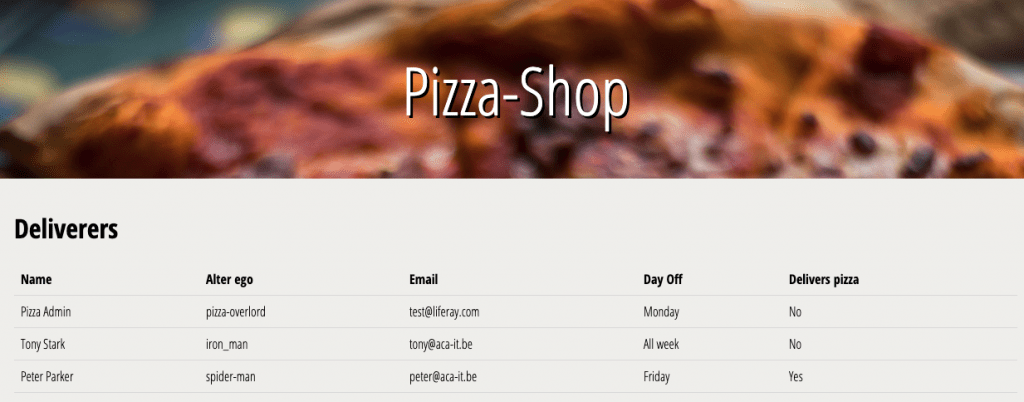
This overview will only contain some basic information, such as:
- Full name
- An email address
- Their day off
- Whether or not they are able to deliver pizzas
If you take a closer look at the Headless Admin User, you’ll notice an endpoint which fetches all user-accounts from a certain site:
/o/headless-admin-user/v1.0/sites/{siteId}/user-accounts
If we treat the employees as users of a site, we can expose their information to the Angular application. In order to meet the full requirement, we will have to enrich our Users with 2 custom fields:
- Day off – which could be a dropdown list
- Pizza deliverer – which will probably be a true/false flag.
Exposing the headless endpoints
Now that we have come up with a way to meet one of the restaurant’s requirements, we have to make sure our Angular application can actually address it without being blocked. We’ll have to do a little bit of configuration in our portal:
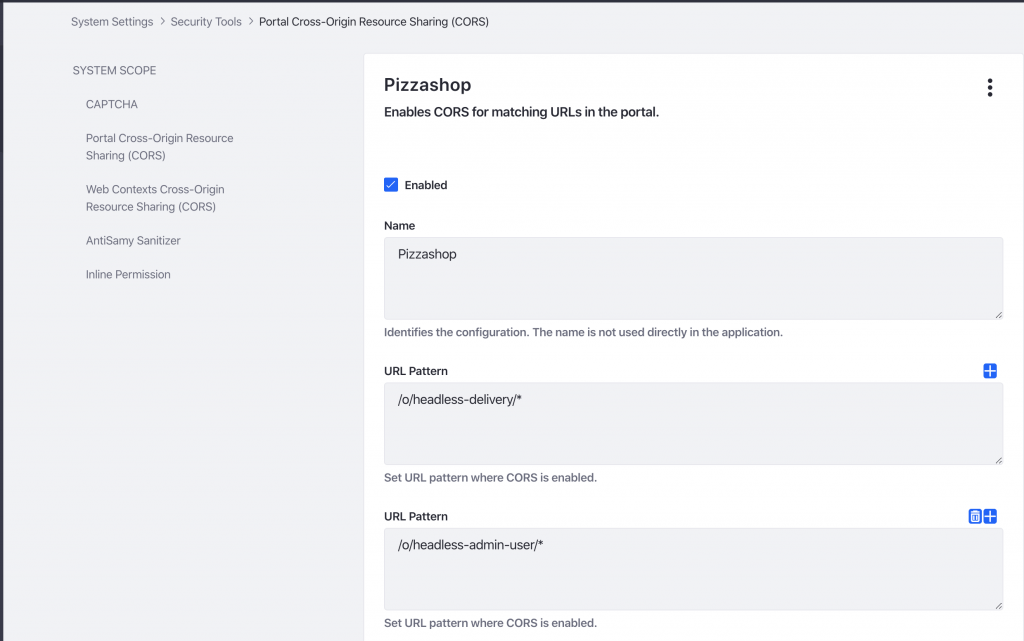
As you can see in this example, I have exposed all endpoints regarding headless-delivery and headless-admin-user. For obvious reasons, you might want to limit this to the endpoints you wish to expose.
Additional information regarding making authenticated requests can be found on Liferay’s official site.
Extracting relevant information
If we fetch all users from our desired site, we get the following response for each user:
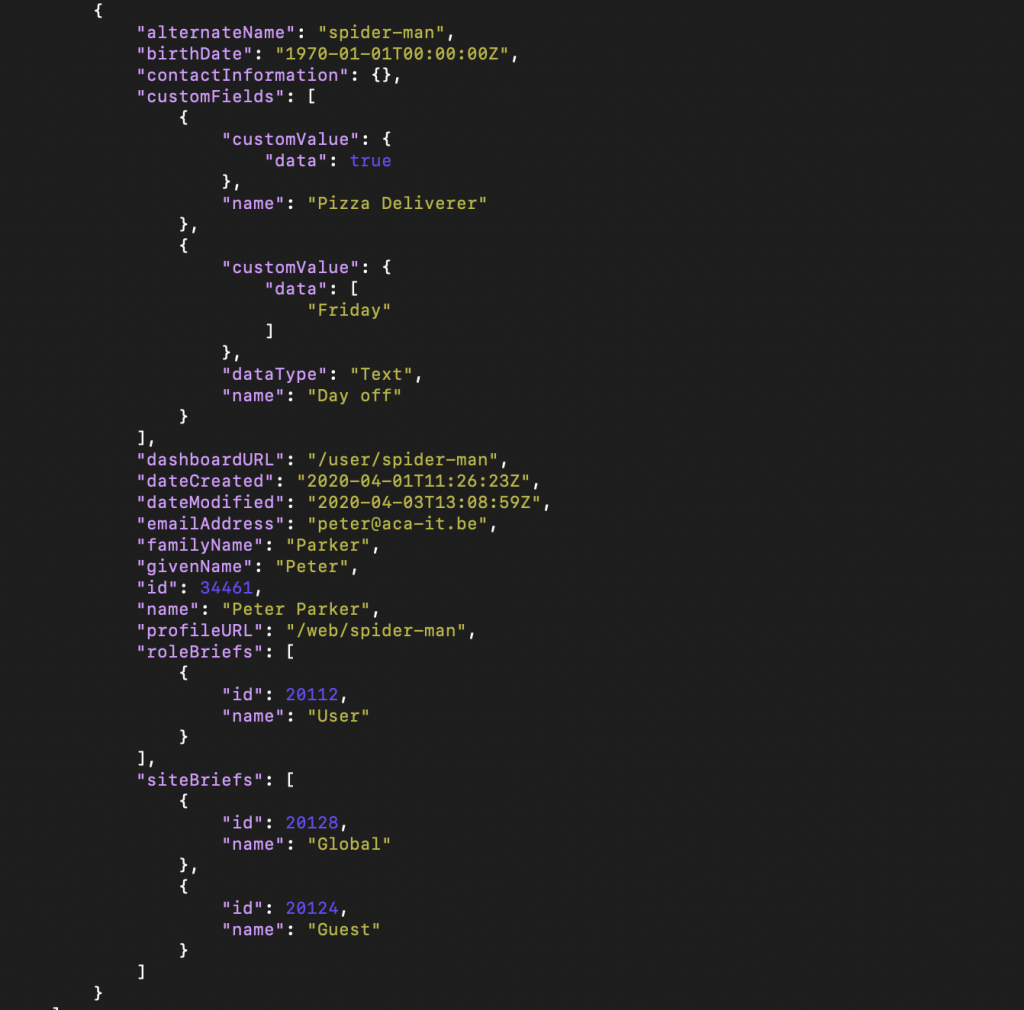
As you can see this response contains all the information we need, but also a lot of redundant information. We can limit our response to only the fields we require by adding them to our request:
/o/headless-admin-user/v1.0/sites/{siteId}/user-accounts?fields=alternateName,customFields,emailAddress,name
That results in the following response for each user:
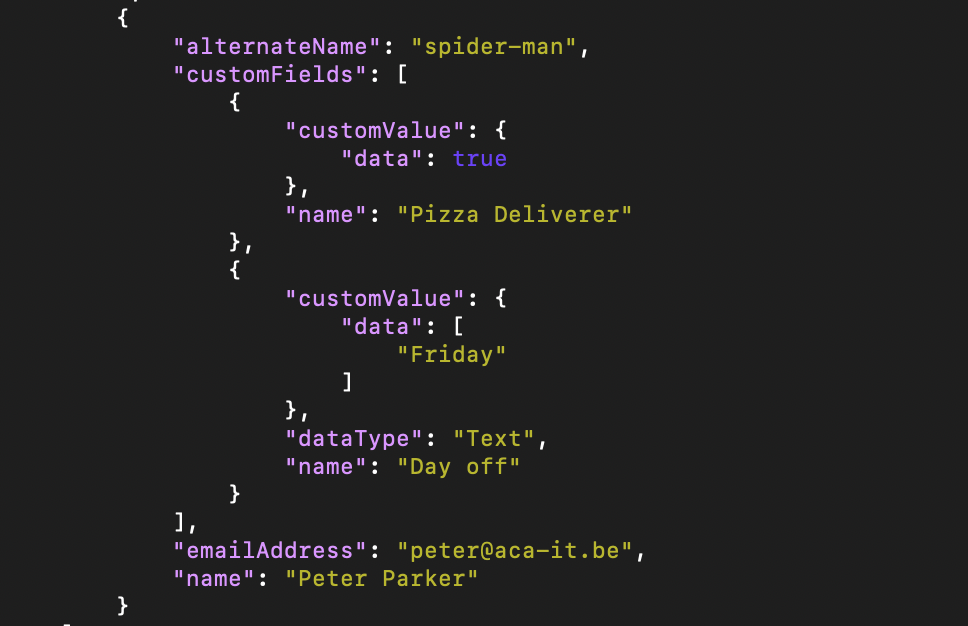
Using this response the Angular application can generate the required overview:
One drawback of this approach is that you’re restricted to Liferay’s domain model. You’ll have to parse the JSON-response manually or match your model to Liferay’s, which in case of these custom fields, could be a hassle.
Creating your custom objects?
In order to create the employee overview, we took advantage of the Liferay Users, which in this case we could map perfectly on our customer’s demand. Although Liferay offers a wide variety of endpoints that could be used to meet your customer’s demands, this won’t always be the case.
Take the pizzas on our menu for instance, they would have to contain the following information:
- The name of the pizza
- A short description
- Level of spiciness
- Additional toppings
- Whether or not the pizza can be delivered
There is no way to map this information on an existing Liferay object. So, we will have to create an object like this ourselves. Preferably, we want to expose these objects through the headless API with as little effort as possible. Seeing as Liferay has not yet blessed us with the ability to create custom objects accompanied with their APIs, we’ll have to think outside of the box here.
Those good old web content articles
If you are familiar with Liferay’s web content articles, you’ll know a web content article uses a ‘Structure’. A structure is something we can create ourselves and thus define its fields. For example we could create the following pizza structure:
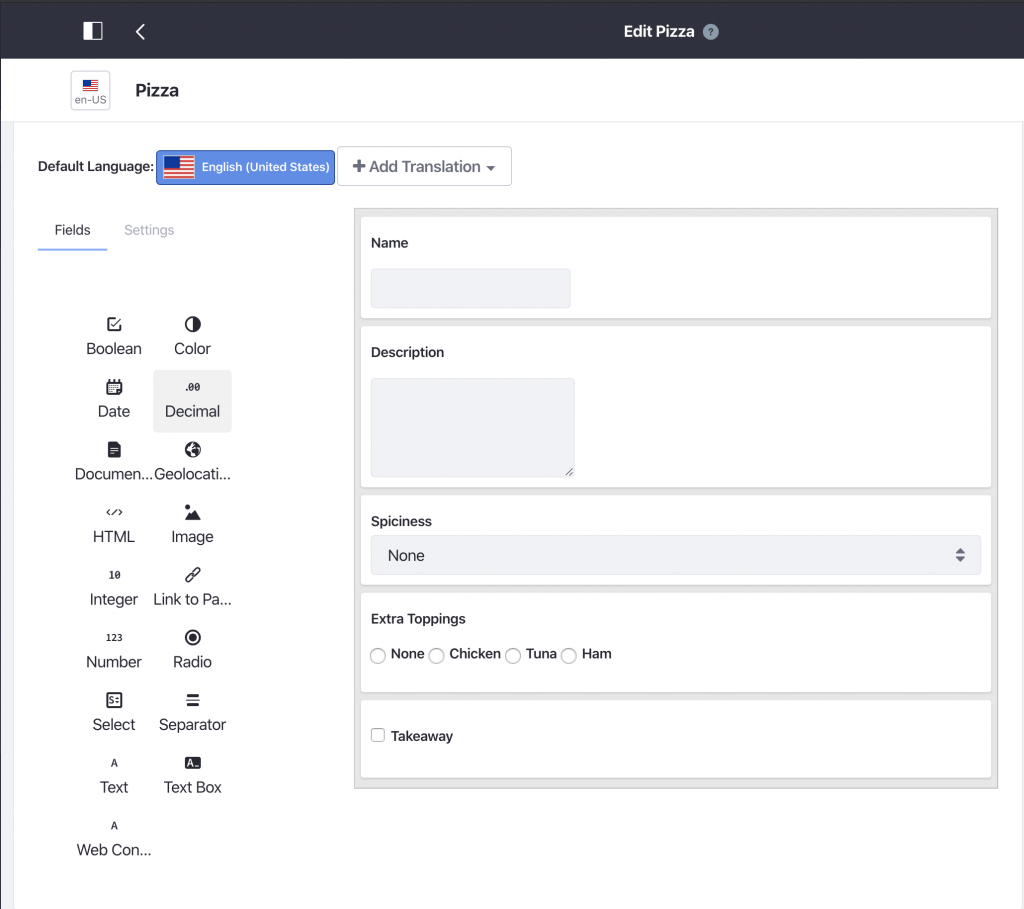
With these structures we are able to create our different pizzas in the form of web content articles. Seeing as a web content article is a built-in feature of Liferay, there is bound to be a endpoint exposing them, namely:
/o/headless-delivery/v1.0/content-structures/{contentStructureId}/structured-contents
However, and you probably already guessed it, this also gives us a lot of redundant information. So we will have to add the relevant fields to the request:
/o/headless-delivery/v1.0/content-structures/{contentStructureId}/structured-contents?fields=contentFields.name,contentFields.value.data
That results in the following response:
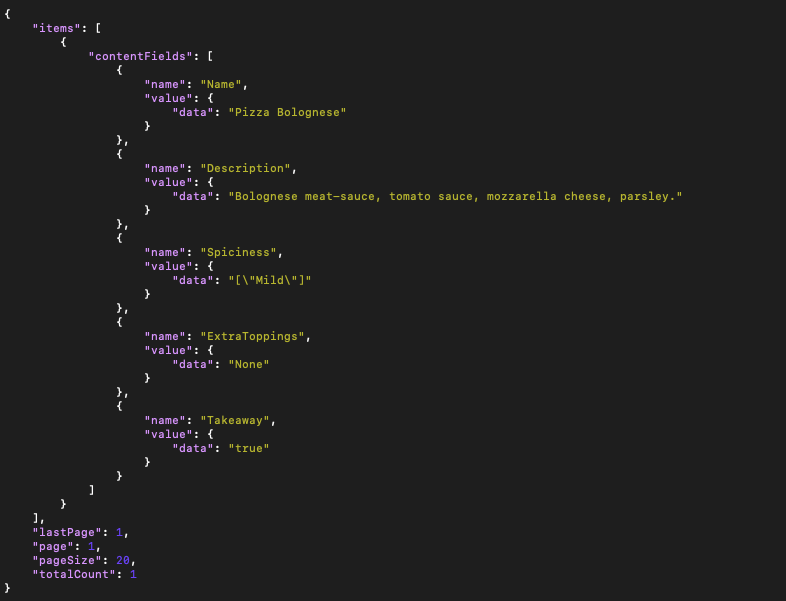
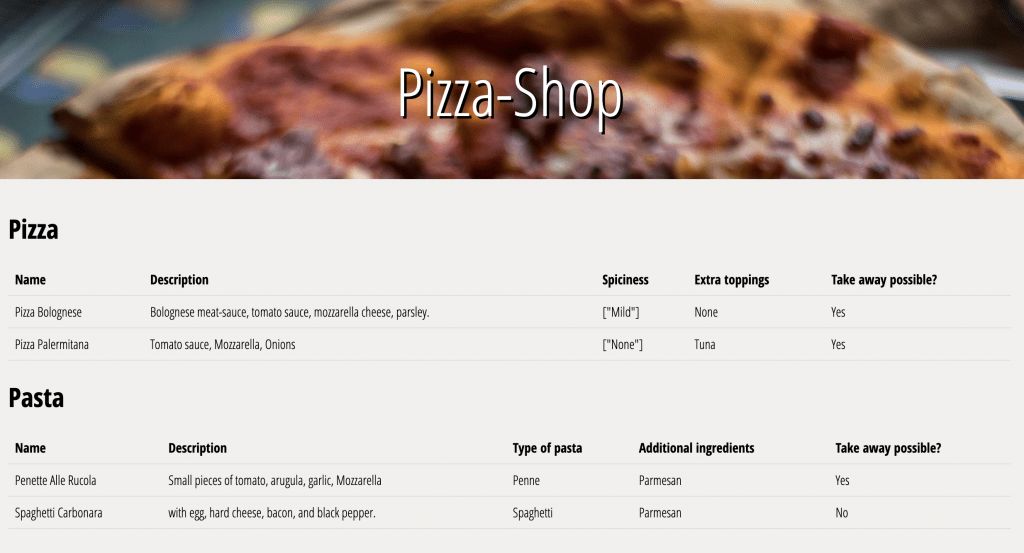
Using this response the Angular application generates the required menu:
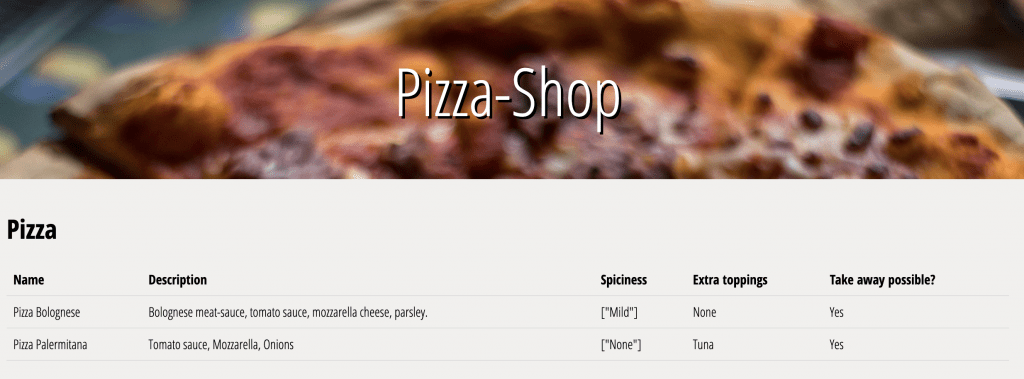
Is there no way to create a custom response?
As you might have noticed, in the example above we are still experiencing the drawback of having to deal with the manual parsing. Ideally we would be able to define the response as well. And it so happens, we can… albeit with a workaround. Web content articles not only use structures, but also templates. And as with structures, we can define these templates as well.
Our local pizza place decided to introduce pastas to the menu. Furthermore this time we don’t want to be dealing with the manual parsing anymore. We would like to take advantage of Angular’s interfaces to do this automagically. Imagine the following interface in your Angular application:
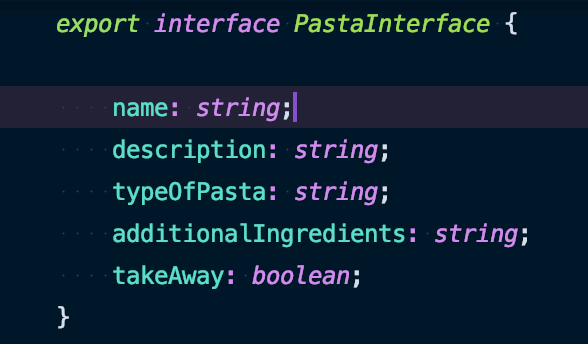
We could define a template ‘Pasta’ In Liferay that matches this interface, for example:
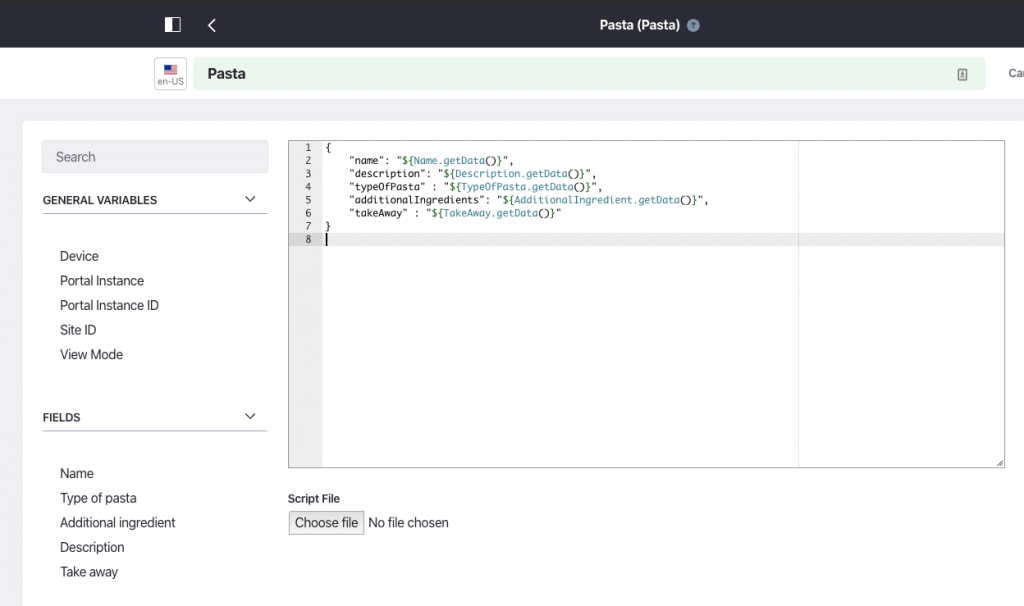
Now all we need is an endpoint that uses our template and luckily for us, it exists:
headless-delivery/v1.0/structured-contents/{structuredContentId}/rendered-content/{templateId}
That results in the following response…
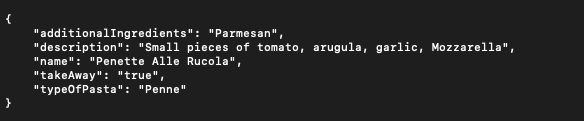
… which can be used to fill in the menu in the Angular Application:
Filter, sort and search
Another great built-in feature is the ability to add a filter, sort or search to request. Meaning Liferay’s headless API will take care of this for you. Here are some examples:
Sorting by title
/o/headless-delivery/v1.0/content-structures/{contentStructureId}/structured-contents?sort=title:desc
Searching for articles with ‘Bolognese’
/o/headless-delivery/v1.0/content-structures/{contentStructureId}/structured-contents?search='Bolognese'
Filtering by title
/o/headless-delivery/v1.0/content-structures/{contentStructureId}/structured-contents?filter=title eq 'Pizza Palermitana'
Leaving the fields empty will only return the pagination information, including the total count of objects found by the request.
/o/headless-delivery/v1.0/content-structures/{contentStructureId}/structured-contents?fields=
You can find more information about filter, sort and search here. Disclaimer: Filter, sort and search can not be used when you’re using your own custom template. However there is a workaround for this as well, albeit with the drawback of having to do 1 + n requests: You can sort/filter/search your items using the default response of Liferay, which includes an URL that will lead you to your custom response:
/o/headless-delivery/v1.0/content-structures/{contentStructureId}/structured-contents?fields=renderedContents.renderedContentURL'
What about the contentstructureId and the templateId?
It’s true that when you create a new structure or template, its Id is generated on the fly. However for every little problem there is a solution. For this problem in particular, there are 2 possible approaches:
- creating your structure and template programmatically, meaning you can define the ID of your structure and template;
- or using content sets, which is a new built-in feature of Liferay 7.2.
Seeing as we want to do as little effort as possible, we’ll go for option number 2: content sets.
Without going too much into detail, content sets are basically what they sound like: a collection of content which can be defined by an administrator. Luckily for us we can make a collection, for example, out of all web content articles based on one or more structures. This means we can make a content set out of all our pizzas and pastas, which also lets you add filtering and ordering through the control panel.
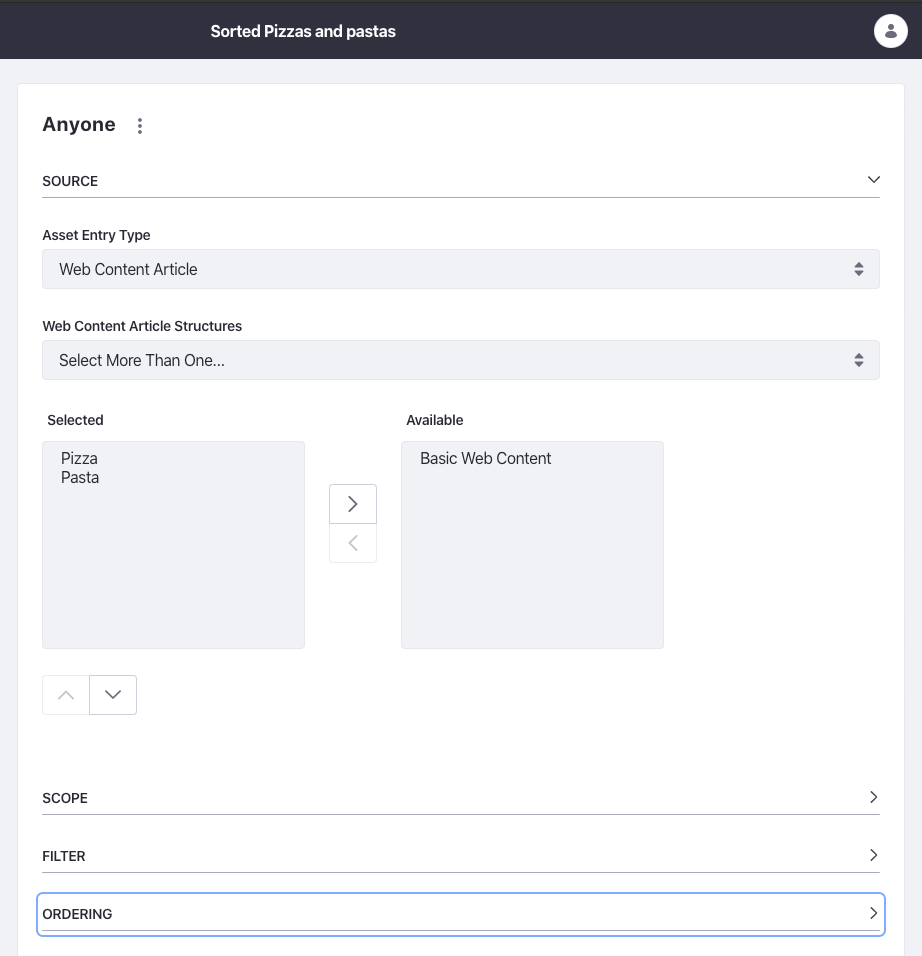
You might already feel where I’m going with this. Yes, there’s also an endpoint that allows us to get the web content articles via the content set:
o/headless-delivery/v1.0/sites/{siteId}/content-sets/by-key/{key}/content-set-elements
The key is generated based on the name of the content set, where the spaces are replaced by a hyphen. Sorted Pizzas and Pastas would generate the key ‘sorted-pizzas-and-pastas’. More information and how to create a content set can be found here.
Liferay 7.2 headless APIs: conclusion
Without a doubt Liferay 7.2 headless APIs have the potential to enrich custom solutions with the Liferay features we’ve come to know and love. However, with the introduction of these headless APIs I had hoped we would have a built-in feature to easily create our own custom objects and the ability to expose them through dedicated APIs. That being said, being able to somewhat reproduce this feature through web content articles and their headless APIs speaks to the flexibility and extensibility of Liferay itself.
I for one look forward to what they have in store for us next!

What others have also read


In software development, assumptions can have a serious impact and we should always be on the look-out. In this blog post, we talk about how to deal with assumptions when developing software. Imagine…you’ve been driving to a certain place A place you have been driving to every day for the last 5 years, taking the same route, passing the same abandoned street, where you’ve never seen another car. Gradually you start feeling familiar with this route and you assume that as always you will be the only car on this road. But then at a given moment in time, a car pops up right in front of you… there had been a side street all this time, but you had never noticed it, or maybe forgot all about it. You hit the brakes and fortunately come to a stop just in time. Assumption nearly killed you. Fortunately in our job, the assumptions we make are never as hazardous to our lives as the assumptions we make in traffic. Nevertheless, assumptions can have a serious impact and we should always be on the look-out. Imagine… you create websites Your latest client is looking for a new site for his retirement home because his current site is outdated and not that fancy. So you build a Fancy new website based on the assumption that Fancy means : modern design, social features, dynamic content. The site is not the success he had anticipated … strange … you have build exactly what your client wants. But did you build what the visitors of the site want? The average user is between 50 – 65 years old, looking for a new home for their mom and dad. They are not digital natives and may not feel at home surfing on a fancy, dynamic website filled with twitter feeds and social buttons. All they want is to have a good impression of the retirement home and to get reassurance of the fact that they will take good care of their parents. The more experienced you’ll get, the harder you will have to watch out not to make assumptions and to double-check with your client AND the target audience . Another well known peril of experience is “ the curse of knowledge “. Although it sounds like the next Pirates of the Caribbean sequel, the curse of knowledge is a cognitive bias that overpowers almost everyone with expert knowledge in a specific sector. It means better-informed parties find it extremely difficult to think about problems from the perspective of lesser-informed parties. You might wonder why economists don’t always succeed in making the correct stock-exchange predictions. Everyone with some cash to spare can buy shares. You don’t need to be an expert or even understand about economics. And that’s the major reason why economists are often wrong. Because they have expert knowledge, they can’t see past this expertise and have trouble imagining how lesser informed people will react to changes in the market. The same goes for IT. That’s why we always have to keep an eye out, we don’t stop putting ourselves in the shoes of our clients. Gaining insight in their experience and point of view is key in creating the perfect solution for the end user. So how do we tackle assumptions …? I would like to say “Simple” and give you a wonderful oneliner … but as usual … simple is never the correct answer. To manage the urge to switch to auto-pilot and let the Curse of Knowledge kick in, we’ve developed a methodology based on several Agile principles which forces us to involve our end user in every phase of the project, starting when our clients are thinking about a project, but haven’t defined the solution yet. And ending … well actually never. The end user will gain new insights, working with your solution, which may lead to new improvements. In the waterfall methodology at the start of a project an analysis is made upfront by a business analist. Sometimes the user is involved of this upfront analysis, but this is not always the case. Then a conclave of developers create something in solitude and after the white smoke … user acceptance testing (UAT) starts. It must be painful for them to realise after these tests that the product they carefully crafted isn’t the solution the users expected it to be. It’s too late to make vigorous changes without needing much more time and budget. An Agile project methodology will take you a long way. By releasing testable versions every 2 to 3 weeks, users can gradually test functionality and give their feedback during development of the project. This approach will incorporate the user’s insights, gained throughout the project and will guarantee a better match between the needs of the user and the solution you create for their needs. Agile practitioners are advocating ‘continuous deployment’; a practice where newly developed features will be deployed immediately to a production environment instead of in batches every 2 to 3 weeks. This enables us to validate the system (and in essence its assumptions) in the wild, gain valuable feedback from real users, and run targeted experiments to validate which approach works best. Combining our methodology with constant user involvement will make sure you eliminate the worst assumption in IT: we know how the employees do their job and what they need … the peril of experience! Do we always eliminate assumptions? Let me make it a little more complicated: Again… imagine: you’ve been going to the same supermarket for the last 10 years, it’s pretty safe to assume that the cereal is still in the same aisle, even on the same shelf as yesterday. If you would stop assuming where the cereal is … this means you would lose a huge amount of time, browsing through the whole store. Not just once, but over and over again. The same goes for our job. If we would do our job without relying on our experience, we would not be able to make estimations about budget and time. Every estimation is based upon assumptions. The more experienced you are, the more accurate these assumptions will become. But do they lead to good and reliable estimations? Not necessarily… Back to my driving metaphor … We take the same road to work every day. Based upon experience I can estimate it will take me 30 minutes to drive to work. But what if they’ve announced traffic jams on the radio and I haven’t heard the announcement… my estimation will not have been correct. At ACA Group, we use a set of key practices while estimating. First of all, it is a team sport. We never make estimations on our own, and although estimating is serious business, we do it while playing a game: Planning poker. Let me enlighten you; planning poker is based upon the principle that we are better at estimating in group. So we read the story (chunk of functionality) out loud, everybody takes a card (which represent an indication of complexity) and puts them face down on the table. When everybody has chosen a card, they are all flipped at once. If there are different number shown, a discussion starts on the why and how. Assumptions, that form the basis for one’s estimate surface and are discussed and validated. Another estimation round follows, and the process continues till consensus is reached. The end result; a better estimate and a thorough understanding of the assumptions surrounding the estimate. These explicit assumptions are there to be validated by our stakeholders; a great first tool to validate our understanding of the scope.So do we always eliminate assumptions? Well, that would be almost impossible, but making assumptions explicit eliminates a lot of waste. Want to know more about this Agile Estimation? Check out this book by Mike Cohn . Hey! This is a contradiction… So what about these assumptions? Should we try to avoid them? Or should we rely on them? If you assume you know everything … you will never again experience astonishment. As Aristotle already said : “It was their wonder, astonishment, that first led men to philosophize”. Well, a process that validates the assumptions made through well conducted experiments and rapid feedback has proven to yield great results. So in essence, managing your assumptions well, will produce wonderful things. Be aware though that the Curse of Knowledge is lurking around the corner waiting for an unguarded moment to take over. Interested in joining our team? Interested in meeting one of our team members? Interested in joining our team? We are always looking for new motivated professionals to join the ACA team! {% module_block module "widget_3ad3ade5-e860-4db4-8d00-d7df4f7343a4" %}{% module_attribute "buttons" is_json="true" %}{% raw %}[{"appearance":{"link_color":"light","primary_color":"primary","secondary_color":"primary","tertiary_color":"light","tertiary_icon_accent_color":"dark","tertiary_text_color":"dark","variant":"primary"},"content":{"arrow":"right","icon":{"alt":null,"height":null,"loading":"disabled","size_type":null,"src":"","width":null},"tertiary_icon":{"alt":null,"height":null,"loading":"disabled","size_type":null,"src":"","width":null},"text":"View career opportunities"},"target":{"link":{"no_follow":false,"open_in_new_tab":false,"rel":"","sponsored":false,"url":{"content_id":229022099665,"href":"https://25145356.hs-sites-eu1.com/en/jobs","href_with_scheme":null,"type":"CONTENT"},"user_generated_content":false}},"type":"normal"}]{% endraw %}{% end_module_attribute %}{% module_attribute "child_css" is_json="true" %}{% raw %}{}{% endraw %}{% end_module_attribute %}{% module_attribute "css" is_json="true" %}{% raw %}{}{% endraw %}{% end_module_attribute %}{% module_attribute "definition_id" is_json="true" %}{% raw %}null{% endraw %}{% end_module_attribute %}{% module_attribute "field_types" is_json="true" %}{% raw %}{"buttons":"group","styles":"group"}{% endraw %}{% end_module_attribute %}{% module_attribute "isJsModule" is_json="true" %}{% raw %}true{% endraw %}{% end_module_attribute %}{% module_attribute "label" is_json="true" %}{% raw %}null{% endraw %}{% end_module_attribute %}{% module_attribute "module_id" is_json="true" %}{% raw %}201493994716{% endraw %}{% end_module_attribute %}{% module_attribute "path" is_json="true" %}{% raw %}"@projects/aca-group-project/aca-group-app/components/modules/ButtonGroup"{% endraw %}{% end_module_attribute %}{% module_attribute "schema_version" is_json="true" %}{% raw %}2{% endraw %}{% end_module_attribute %}{% module_attribute "smart_objects" is_json="true" %}{% raw %}null{% endraw %}{% end_module_attribute %}{% module_attribute "smart_type" is_json="true" %}{% raw %}"NOT_SMART"{% endraw %}{% end_module_attribute %}{% module_attribute "tag" is_json="true" %}{% raw %}"module"{% endraw %}{% end_module_attribute %}{% module_attribute "type" is_json="true" %}{% raw %}"module"{% endraw %}{% end_module_attribute %}{% module_attribute "wrap_field_tag" is_json="true" %}{% raw %}"div"{% endraw %}{% end_module_attribute %}{% end_module_block %}
Read more

ACA does a lot of projects. In the last quarter of 2017, we did a rather small project for a customer in the financial industry. The deadline for the project was at the end of November and our customer was getting anxious near the end of September. We were confident we could pull off the job on time though and decided to try out an experiment. We got the team together in one room and started mob programming . Mob what? We had read an article that explains the concept of mob programming. In short, mob programming means that the entire team sits together in one room and works on one user story at a time. One person is the ‘driver’ and does the coding for a set amount of time. When that time has passed, the keyboard switches to another team member. We tried the experiment with the following set-up: Our team was relatively small and only had 4 team members. Since the project we were working on was relatively small, we could only assing 4 people. The user stories handled were only a part of the project. Because this was en experiment, we did not want the project - as small as it was - to be mobbed completely. Hence, we chose one specific epic and implemented those user stories in the mob. We did not work on the same computer. We each had a separate laptop and checked in our code to a central versioning system instead of switching the keyboard. This wasn't really a choice we made, just something that happened. We switched every 20 minutes. The article we referred to talks about 12, but we thought that would be too short and decided to go with 20 minutes instead. Ready, set, go! We spent more than a week inside a meeting room where we could, in turn, connect our laptops to one big screen. The first day of the experiment, we designed. We stood at the whiteboard for hours deciding on the architecture of the component we were going to build. On the same day, our mob started implementing the first story. We really took off! We flew through the user story, calling out to our customer proxy when some requirements were not clear. Near the end of the day, we were exhausted. Our experiment had only just started and it was already so intense. The next days, we continued implementing the user stories. In less than a week, we had working software that we could show to our customer. While it wasn’t perfect yet and didn’t cover all requirements, our software was able to conduct a full, happy path flow after merely 3 days. Two days later, we implemented enhancements and exception cases discussed through other user stories. Only one week had passed since our customer started getting anxious and we had implemented so much we could show him already. Finishing touches Near the end of the project, we only needed to take care of some technicalities. One of those was making our newly-built software environment agnostic. If we would have finished this user story with pair programming, one pair would know all the technical details of the software. With mob programming, we did not need to showcase it to the rest of the team. The team already knew. Because we switched laptops instead of keyboards, everyone had done the setup on their own machine. Everyone knew the commands and the configuration. It was knowledge sharing at its best! Other technicalities included configuring our software correctly. This proved to be a boring task for most of the navigators. At this point, we decided the mob experiment had gone far enough. We felt that we were not supposed to do tasks like these with 4 people at the same time. At least, that’s our opinion. Right before the mob disbanded, we planned an evaluation meeting. We were excited and wanted to do this again, maybe even at a bigger scale. Our experience with mob programming The outcome of our experiment was very positive. We experienced knowledge sharing at different levels. Everyone involved knew the complete functionality of the application and we all knew the details of the implementation. We were able to quickly integrate a new team member when necessary, while still working at a steady velocity. We already mentioned that we were very excited before, during and after the experiment. This had a positive impact on our team spirit. We were all more engaged to fulfill the project. The downside was that we experienced mob programming as more exhausting. We felt worn out after a day of being together, albeit in a good way! Next steps Other colleagues noticed us in our meeting room programming on one big screen. Conversations about the experiment started. Our excitement was contagious: people were immediately interested. We started talking about doing more experiments. Maybe we could do mob programming in different teams on different projects. And so it begins… Have you ever tried mob programming? Or are you eager to try? Let’s exchange tips or tricks! We’ll be happy to hear from you!
Read more

Liferay DXP has become a widely adopted portal platform for building and managing advanced digital experiences over recent years. Organizations use it for intranets, customer portals, self-service platforms, and more. While Liferay DXP is known for its user-friendliness, its default search functionality can be further optimized to meet modern user expectations. To address this, ACA developed an advanced solution that significantly enhances Liferay’s standard search capabilities. Learn all about it in this blog. Searching in Liferay: not always efficient Traditionally, organizational searches relied on individual keywords . For example, intranet users would search terms like "leave" or "reimbursement" to find the information they needed. This often resulted in an overload of results and documents , leaving users to sift through them manually to find relevant information—a time-consuming and inefficient process that hampers the user experience. The way users search had changed The rise of AI tools like ChatGPT has transformed how people search for information. This is also visible in online search engines like Google, where users increasingly phrase their queries as complete questions. For example: “How do I apply for leave?” or “What travel reimbursement am I entitled to?” To meet these evolving search needs, search functionality must not only be fast but also capable of understanding natural language. Unfortunately, Liferay’s standard search falls short in this area. ACA develops advanced AI-powered search for Liferay To accommodate today’s search behavior, ACA has created an advanced solution for Liferay DXP 7.4 installations: Liferay AI Search . Leveraging the GPT-4o language model , we’ve succeeded in significantly improving Liferay’s standard search capabilities. GPT-4o is a state-of-the-art language model trained on an extensive dataset of textual information. By integrating GPT-4o into our solution, we’ve customized search algorithms to handle more complex queries , including natural language questions. How does Liferay AI Search work? Closed dataset The AI model only accesses data from within the closed Liferay environment. This ensures that only relevant documents— such as those from the Library and Media Library—are accessible to the model. Administrators controls Administrators can decide which content is included in the GPT-4o dataset, allowing them to further optimize the accuracy and relevance of search results. Depending on the user’s profile, the answers and search results are tailored to the information they are authorized to access. Direct answers Thanks to GPT-4o integration, the search functionality provides not only traditional results but also direct answers to user queries. This eliminates the need for users to dig through search results to find the specific information they need. The comparison below illustrates the difference between search results from Liferay DXP’s standard search and the enhanced results from ACA’s Liferay AI Search. Want to see Liferay AI Search in action? Check out the demo below or via this link! Be nefits of Liferay AI Search Whether you use Liferay DXP for your customer platform or intranet, Liferay AI Search offers numerous advantages for your organization: Increased user satisfaction: Users can quickly find precise answers to their queries. Improved productivity: Less time is spent searching for information. Enhanced knowledge sharing: Important information is easier to locate and share. Conclusion With Liferay AI Search, ACA elevates Liferay DXP’s search functionality to meet modern user expectations. By integrating GPT-4o into Liferay DXP 7.4, this solution delivers not only traditional search results but also direct, relevant answers to complex, natural language queries. This leads to a faster, more user-friendly, and efficient search experience that significantly boosts both productivity and user satisfaction. Ready to optimize your Liferay platform search functionality Contact us today!
Read moreWant to dive deeper into this topic?
Get in touch with our experts today. They are happy to help!

Want to dive deeper into this topic?
Get in touch with our experts today. They are happy to help!

Want to dive deeper into this topic?
Get in touch with our experts today. They are happy to help!

Want to dive deeper into this topic?
Get in touch with our experts today. They are happy to help!